I hosted my first real-world Jitsi Meet videoconference yesterday. It went pretty well, well over an hour actually, for free, gratis, no dollar! I even circumvented the issue of not able to show my fancy-shmancy video of names of participants. As you may recall, one thing that makes Zoom fun is the virtual background, which can be either a static picture or a video. Jitsi has no such feature. To show my video, I loaded it onto a laptop then play the video in a loop in the open-source program VLC. Place the laptop in direct sight of the device that's running the Jitsi meeting, problem solved. A bonus with this solution is that the video's pixelation doesn't look so obvious. Recall that the original source of the video is some GIF animation, which was meant to be viewed as a small part of a web site. Magnify that to full-screen, in a video, and you get pixelation, not very pretty.
The itsy-bitsy issue some of my users had with the Jitsi Meet was that they misunderstood the instruction. It says go to so-and-so link and enter this phrase when you are prompted to enter you-know-what. I like to leave out the word password in my instruction whenever possible, to avoid having the content scanned and password easily detected. What did two of my users did? They launched the Jitsi Meet app and went straight to entering the password as a meeting room. That's the first thing that comes into focus when you use the Jitsi Meet app, it asks for a room name, to either create or join. In effect, my users created their own room, instead of joining the one already in progress. In the future, I may try starting a meeting with no password, to eliminate any possibility of anyone accidentally creating their own room. When there's a core number of attendees having joined, then I'll create the password and let people reach out to me when they are prompted for a password.
With Zoom, you can include the password in the invitation link. That's one advantage Zoom has over Jitsi Meet, but I do wonder if there's some coding that can be added to a Jitsi Meet link that would include the password. I'll check that out and report back...
09 June 2020
LET US GET JIGGLY WITH JITSI MEET
The Internet is great but sometimes searching it without the exact term to look for can be an exercise in futility. I first heard about Jitsi as a great alternative to Zoom, the videoconference service that suddenly took over the market in the age of COVID-19, on one of the podcasts hosted by Leo Laporte. It's open-source (read:free, to most people) and has no time-limit, not like the 45-minute constraint faced by Zoom non-subscribers. Some time later, someone else mentioned it so I decided to check it out. On a side note, it annoys me greatly that many people these days don't go directly to a website even when one is give to them, but instead first go to Google.com or such and search for said web site. Such action can be so time-wasting, as you don't necessarily find what you need right away. Such is the case with me and Jitsi, in the beginning.
All I had to go by was the term Jitsi so I had to search for it. One link after another, I found myself downloading some Jitsi application for the Mac that prompted me to login, either via Google Talk, AIM, or some other chat network. Definitely not what I was looking for. I used to use x number of chat clients and it was such a pain keeping so many accounts and passwords. I never want to go back to that. Then there was some other Jitsi thingamajitsi that can be downloaded to have my own Jitsi server. Good grief, I just want to start a meeting with someone to test things out, why do I have to setup a server just for that? I started to try to find documentation for Jitsi. Some doc pointed me to jit.si but it's a dead link. Some other doc had a nice table of content but page after page merely says Welcome to Jitsi with no useful content whatsoever. Talk about going down the rabbit hole! Running into cul-de-sacs on the information highway!
What I should really search for was Jitsi Meet. People wrongly associate terms with the actual things themselves regularly, either because they are too familiar with the product, or just ignorance. I've heard users refer to Google Chrome, the web browser, as just Google. It dries me nuts! The best thing I could have done, assuming I had the exact info handy, was to go straight to https://meet.jit.si/ . Jitsi Meet's approach is a bit different, in that you just enter a room name and away you go. The Jitsi Meet web site has some code running that makes up random room names for visitors to use. I was initially lost and used one of those random names just to see what's going on. The thing is just click in the box where the name is being generated and make up your own name then you are all set. Note that there is no scheduling capability. You just create the room on the fly, when everyone gets out, the room disappears. Past room names are remembered by the web browser or smartphone app, so the room can be created anew when needed In a way it looks like the meeting can be scheduled, but it's really not.
Once in a meeting, things are not that much different than Zoom or other videoconference web sites. You can mute yourself, mute participants if you are the host, blur the background, start a chat, the usual stuff. End-to-end encryption is in beta but that makes Jitsi Meet attractive security-wise. You cannot setup a fancy virtual background, so it's a minor loss. (Ironically, just the other day I spent much time cobbling together a process to make fancy video of names of Zoom participants. Now the video is useless for these Jitsi Meeting.)
On a computer, you truly don't need any software. I discovered later the chat client I downloaded is Jitsi Desktop. It has little to do with the videoconferencing capability of Jitsi Meet. Jitsi Meet may be a side project of Jitsi Desktop, but for the average user pretend you never heard of Jitsi Desktop. Just go straight to meet.jit.si . Likewise, you don't need to install any server software if all you want to do is host or attend a meeting. The server stuff is for the Linux platform anyway, like Debian or Ubuntu. I don' care what the Linux gurus say, the average user doesn't need to know about Linux. One more time, meet.jit.si is all you need. You do need to setup a name before you can participate in a chat, but that's the extent of "setting up" to use Jitsi Meet on a computer.
On a smartphone, you do need to install the free app. It's straightforward, nothing to stress about. In case you somehow have to type the name of the meeting, it is case-insensitive, i.e. case doesn't matter. I was worried since Jitsi Meet is open-source and since there was mention of Linux and Unix, a world where case matters, that Jitsi Meetings are case-sensitive also but luckily it's not.
Jitsi Meet is a very viable alternative to Zoom. I got free minutes from Zoom before, I don't know what algorithm determined that, so it's possible your Zoom meeting is long enough to get things done. However, if you don't want to worry about time-limit and can live without the convenience of having a schedule, or the fancy virtual backgrounds, Jitsi Meet is a natural choice, especially for those mindful of spending money.
All I had to go by was the term Jitsi so I had to search for it. One link after another, I found myself downloading some Jitsi application for the Mac that prompted me to login, either via Google Talk, AIM, or some other chat network. Definitely not what I was looking for. I used to use x number of chat clients and it was such a pain keeping so many accounts and passwords. I never want to go back to that. Then there was some other Jitsi thingamajitsi that can be downloaded to have my own Jitsi server. Good grief, I just want to start a meeting with someone to test things out, why do I have to setup a server just for that? I started to try to find documentation for Jitsi. Some doc pointed me to jit.si but it's a dead link. Some other doc had a nice table of content but page after page merely says Welcome to Jitsi with no useful content whatsoever. Talk about going down the rabbit hole! Running into cul-de-sacs on the information highway!
What I should really search for was Jitsi Meet. People wrongly associate terms with the actual things themselves regularly, either because they are too familiar with the product, or just ignorance. I've heard users refer to Google Chrome, the web browser, as just Google. It dries me nuts! The best thing I could have done, assuming I had the exact info handy, was to go straight to https://meet.jit.si/ . Jitsi Meet's approach is a bit different, in that you just enter a room name and away you go. The Jitsi Meet web site has some code running that makes up random room names for visitors to use. I was initially lost and used one of those random names just to see what's going on. The thing is just click in the box where the name is being generated and make up your own name then you are all set. Note that there is no scheduling capability. You just create the room on the fly, when everyone gets out, the room disappears. Past room names are remembered by the web browser or smartphone app, so the room can be created anew when needed In a way it looks like the meeting can be scheduled, but it's really not.
Once in a meeting, things are not that much different than Zoom or other videoconference web sites. You can mute yourself, mute participants if you are the host, blur the background, start a chat, the usual stuff. End-to-end encryption is in beta but that makes Jitsi Meet attractive security-wise. You cannot setup a fancy virtual background, so it's a minor loss. (Ironically, just the other day I spent much time cobbling together a process to make fancy video of names of Zoom participants. Now the video is useless for these Jitsi Meeting.)
On a computer, you truly don't need any software. I discovered later the chat client I downloaded is Jitsi Desktop. It has little to do with the videoconferencing capability of Jitsi Meet. Jitsi Meet may be a side project of Jitsi Desktop, but for the average user pretend you never heard of Jitsi Desktop. Just go straight to meet.jit.si . Likewise, you don't need to install any server software if all you want to do is host or attend a meeting. The server stuff is for the Linux platform anyway, like Debian or Ubuntu. I don' care what the Linux gurus say, the average user doesn't need to know about Linux. One more time, meet.jit.si is all you need. You do need to setup a name before you can participate in a chat, but that's the extent of "setting up" to use Jitsi Meet on a computer.
On a smartphone, you do need to install the free app. It's straightforward, nothing to stress about. In case you somehow have to type the name of the meeting, it is case-insensitive, i.e. case doesn't matter. I was worried since Jitsi Meet is open-source and since there was mention of Linux and Unix, a world where case matters, that Jitsi Meetings are case-sensitive also but luckily it's not.
Jitsi Meet is a very viable alternative to Zoom. I got free minutes from Zoom before, I don't know what algorithm determined that, so it's possible your Zoom meeting is long enough to get things done. However, if you don't want to worry about time-limit and can live without the convenience of having a schedule, or the fancy virtual backgrounds, Jitsi Meet is a natural choice, especially for those mindful of spending money.
08 June 2020
MAKING OF CUSTOM, FANCY-NAME VIDEOS
May someday someone will write a program that lets you type in a word, then animate it in some fancy way, save the animation in some video formats, and finally combine a few of such videos into a longer one. Maybe it already exists but I just don't know about it. It may cost a lot of money or may be totally free. I do have my own process and it only costs me the price of buying AmigaForever.
It is not a pretty process but it works for me. To review, this is one example of the end product of my process, just a couple of names written in some fancy way:
The first step is to make the animation in PersonalPaint (PPaint), a paint program for the Amiga platform. I run E-UAE emulator on my Mac and make use of the necessary Amiga programs and such from the AmigaForever package. The Amiga platform is blessed to have these AnimatedFonts created just for the platform. I think Adobe AfterEffects may have something similar, but I don't have the money for Adobe products. The AnimatedFonts may have been created originally for the DeluxePaint program but PPaint also supports them. PPaint takes the tedium out of using the AnimatedFonts by using ARexx, a scripting language for the Amiga, based on the standard Rexx. You select the crown icon (rex = king), choose the proper script and fill in some parameters then execute the script. In my case, I use only the Animate Text and the Save to GIF scripts. The Amiga platform has its own AnimBrush animation format that most of the rest of the world doesn't care about, so to have the product used outside of the Amiga platform it's necessary to convert the animbrush files to the animgif format. Name by name, I would write them then convert to animgif. I find that having each frame set to 10 and the last frame set to 60 show the animation at a reasonable speed. I also do not use Transparency so that the animation appears on a black background instead of a white one.
Animgif files are great but for my purpose I need something in a video format. I cannot recall if I spent much time researching but my conversion tool of choice is via the web site EZGIF.com. There are many tools to slice and dice animgif files but to me the most useful is converting them to MP4. As soon as I click Save, the MP4 comes down with some default name. I would go into my Downloads folder and rename the file to match the name from the animgif.
Not too long ago I finally discovered the joy of using iMovie. It was a natural progression to try to use iMovie to compile my various MP4 into one nice movie. Alas, that's not the case. For some reason, some MP4 wouldn't play properly. Instead of starting from the beginning they would start somewhere in the middle and ends somewhere else near the end. The files would play fine in VLC or QuickTimePlayer, they just don't play well within iMovie. I also tried the free Spark Editor from Adobe, same result. Very weird. Luckily, I stumbled upon ClipChamp.com and it works like a charm. The interface is very similar to iMovie, maybe it's just a standard thing. You can even add generic music and other effects but I decided to keep things simple and only use ClipChamp to string the various MP4 files into one movie. Exporting the movies at the lowest resolution is free and that's by me.
There you have it, quite a process but it works:
It is not a pretty process but it works for me. To review, this is one example of the end product of my process, just a couple of names written in some fancy way:
The first step is to make the animation in PersonalPaint (PPaint), a paint program for the Amiga platform. I run E-UAE emulator on my Mac and make use of the necessary Amiga programs and such from the AmigaForever package. The Amiga platform is blessed to have these AnimatedFonts created just for the platform. I think Adobe AfterEffects may have something similar, but I don't have the money for Adobe products. The AnimatedFonts may have been created originally for the DeluxePaint program but PPaint also supports them. PPaint takes the tedium out of using the AnimatedFonts by using ARexx, a scripting language for the Amiga, based on the standard Rexx. You select the crown icon (rex = king), choose the proper script and fill in some parameters then execute the script. In my case, I use only the Animate Text and the Save to GIF scripts. The Amiga platform has its own AnimBrush animation format that most of the rest of the world doesn't care about, so to have the product used outside of the Amiga platform it's necessary to convert the animbrush files to the animgif format. Name by name, I would write them then convert to animgif. I find that having each frame set to 10 and the last frame set to 60 show the animation at a reasonable speed. I also do not use Transparency so that the animation appears on a black background instead of a white one.
Animgif files are great but for my purpose I need something in a video format. I cannot recall if I spent much time researching but my conversion tool of choice is via the web site EZGIF.com. There are many tools to slice and dice animgif files but to me the most useful is converting them to MP4. As soon as I click Save, the MP4 comes down with some default name. I would go into my Downloads folder and rename the file to match the name from the animgif.
Not too long ago I finally discovered the joy of using iMovie. It was a natural progression to try to use iMovie to compile my various MP4 into one nice movie. Alas, that's not the case. For some reason, some MP4 wouldn't play properly. Instead of starting from the beginning they would start somewhere in the middle and ends somewhere else near the end. The files would play fine in VLC or QuickTimePlayer, they just don't play well within iMovie. I also tried the free Spark Editor from Adobe, same result. Very weird. Luckily, I stumbled upon ClipChamp.com and it works like a charm. The interface is very similar to iMovie, maybe it's just a standard thing. You can even add generic music and other effects but I decided to keep things simple and only use ClipChamp to string the various MP4 files into one movie. Exporting the movies at the lowest resolution is free and that's by me.
There you have it, quite a process but it works:
- PersonalPaint either on a real Amiga computer or an emulator. The nice thing with the emulator is the resulting GIFs are on the host computer. You don't have to worry about getting them off an Amiga computer to some web-enabled machine to use the online tools mentioned.
- EZGIF.com to convert the animgif files to MP4
- ClipChamp.com to combine the few MP4 files into a bigger video. I was able to combine nine video files, they are short to begin with though.
07 June 2020
FREE CUSTOM ZOOM BACKGROUND VIDEO
Free is good, right? I have had my share of receiving free stuff from the Internet, yes they do exist. Here's my little gift to the Internet in general.
I have a need to show a video with the names of members of my Zoom workout group. We are not supposed to run together any more, so we meet over Zoom. We each do our own thing, be it treadmill, running-in-place, exercise bike, elliptical, or even actual running on the street. I've been using my StravaArt as a static background picture and want to step up my game. The process is rather involved but here's the offer: provide me a series of names and for each name I will make a video with the fancy AnimatedFont shown in the second video. I then connect all the individual videos into one long one that you can use as as virtual background video during Zoom meetings. Or whatever use you can do with a video, it'll be just an MP4 file. There is a limited of six AnimatedFonts available, but the way they are written can add a little variety. Left to right or simultaneously. Also right to left if you really want to go that far. Just leave a short list of names, say up to ten, optionally specify the font for each name and the way the name is written. I'll reply with a link to my Google Drive where you can download the MP4 file.
I'll get into the nitty-gritty details about making the videos in the next post.
I have a need to show a video with the names of members of my Zoom workout group. We are not supposed to run together any more, so we meet over Zoom. We each do our own thing, be it treadmill, running-in-place, exercise bike, elliptical, or even actual running on the street. I've been using my StravaArt as a static background picture and want to step up my game. The process is rather involved but here's the offer: provide me a series of names and for each name I will make a video with the fancy AnimatedFont shown in the second video. I then connect all the individual videos into one long one that you can use as as virtual background video during Zoom meetings. Or whatever use you can do with a video, it'll be just an MP4 file. There is a limited of six AnimatedFonts available, but the way they are written can add a little variety. Left to right or simultaneously. Also right to left if you really want to go that far. Just leave a short list of names, say up to ten, optionally specify the font for each name and the way the name is written. I'll reply with a link to my Google Drive where you can download the MP4 file.
I'll get into the nitty-gritty details about making the videos in the next post.
22 May 2020
GOOD OL' WALL STREET POWERBOOK G3
In recent days, I played around with some old computers I have in my attic and elsewhere. Today I spent some time with my first Mac computer, a Macintosh Powerbook G3, aka Wall Street. I re-learned so many things I need to write this down somewhere easily accessible, maybe the general public can find some useful info, too.
I got the old Powerbook with Mac OS 9.x and now it runs some early version of OS X. I found the preference setting to reboot into OS 9 but then it seems to be stuck when I tried to locate the equivalent option to reboot into OS X. Second time around booting into OS 9 I gave Startup Disk some extra time to crunch the hard drive to present the OS X boot folder. Whew! Not that I plan to do anything useful with it.
How did we get by back in those dark days!? A laptop with no WiFi?! No freedom of movement, just tied to whatever desk that has an Ethernet cord connected to the router! The optical drive was just a CD-R, I thought it was DVD! No wonder there was no DVD Player application in the computer. Still, when I inserted a regular music CD nothing happened. No icon for the disc, iTunes didn't see it as a source. Maybe back then OS X or 9 didn't support importing of music? Who knows, but I am not going to sweat it, for now.
It was my first Mac and I spent much time and energy to expand it. I think it came with a removable battery and a removable optical drive. A little knob at the front left and right corners is used to eject the whole unit. On the left bay I added a SuperDisk removable drive from VST Technologies, with capacity of 120 MB! The battle between Iomega Zip and Bernoulli whatever-its-name was still going on and the max capacity at the time was 100 MB. So VST outdid those guys by 20 MB, except that it never caught on. I have just one of those 120 MB disk. The drive is capable of reading 3.5" floppy disks, woohoo! I just test wrote a file to some random floppy that I still have. I have this crazy idea that someday someone important will offer me a huge sum of money to get something off a floppy disk. With this laptop, I can read the disk but then what? It has a PCMCIA slot and I have a PC-card adapter to add two high-speed USB 2.0 ports, alas when I connected a 128 MB flash to it nothing happened. (I was mindful to not use some flash drive with capacity of GBs in case the old OS doesn't recognize such high capacity.) Maybe I would need additional driver. Maybe the USB ports are for mice and such only. I suppose worst-case scenario I can connect the laptop to an Ethernet network and transfer files via the network.
What a trip down memory lane!
I got the old Powerbook with Mac OS 9.x and now it runs some early version of OS X. I found the preference setting to reboot into OS 9 but then it seems to be stuck when I tried to locate the equivalent option to reboot into OS X. Second time around booting into OS 9 I gave Startup Disk some extra time to crunch the hard drive to present the OS X boot folder. Whew! Not that I plan to do anything useful with it.
How did we get by back in those dark days!? A laptop with no WiFi?! No freedom of movement, just tied to whatever desk that has an Ethernet cord connected to the router! The optical drive was just a CD-R, I thought it was DVD! No wonder there was no DVD Player application in the computer. Still, when I inserted a regular music CD nothing happened. No icon for the disc, iTunes didn't see it as a source. Maybe back then OS X or 9 didn't support importing of music? Who knows, but I am not going to sweat it, for now.
It was my first Mac and I spent much time and energy to expand it. I think it came with a removable battery and a removable optical drive. A little knob at the front left and right corners is used to eject the whole unit. On the left bay I added a SuperDisk removable drive from VST Technologies, with capacity of 120 MB! The battle between Iomega Zip and Bernoulli whatever-its-name was still going on and the max capacity at the time was 100 MB. So VST outdid those guys by 20 MB, except that it never caught on. I have just one of those 120 MB disk. The drive is capable of reading 3.5" floppy disks, woohoo! I just test wrote a file to some random floppy that I still have. I have this crazy idea that someday someone important will offer me a huge sum of money to get something off a floppy disk. With this laptop, I can read the disk but then what? It has a PCMCIA slot and I have a PC-card adapter to add two high-speed USB 2.0 ports, alas when I connected a 128 MB flash to it nothing happened. (I was mindful to not use some flash drive with capacity of GBs in case the old OS doesn't recognize such high capacity.) Maybe I would need additional driver. Maybe the USB ports are for mice and such only. I suppose worst-case scenario I can connect the laptop to an Ethernet network and transfer files via the network.
What a trip down memory lane!
22 April 2020
BROOKLYN REBUS REDUX
Here's another simple puzzle. Can you name the two-word neighborhood of Brooklyn, New York? Again, ignore the fact that I drew an octopus but it does play a role in the puzzle because of the gear it's in.


21 April 2020
BROOKLYN REBUS
I love puzzles, especially those that involve interpreting words or symbols that mean something else. For example, a cluster of cloud with the number 9 means cloud nine, as in to be on cloud nine, meaning to be extremely happy. Rebus may be one way to name such puzzles. With the ongoing quarantine in NYC and elsewhere, I played a few already and finally decided to make one myself. The puzzles I played have a whole grid of items, hopefully as I devote more time into making my original puzzles I will have a whole grid to share too. I have a fascination with octopus and have a whole album in Facebook devoted to sighting of them, so my first thought is to both entertain my octopus fans and be unique with my puzzles by always include the creature in my drawings.
Can you guess the neighborhood of Brooklyn, New York depicted in the drawing below?

Can you guess the neighborhood of Brooklyn, New York depicted in the drawing below?

14 April 2020
I HEART iMOVIE, SORT OF
It is indeed true that Necessity is the Mother of Invention. No, I didn't invent anything that can change the world drastically. It's just that all these times as a Mac owner I rarely play with iMovie, which is part of the iLife suite of multimedia applications bundled with every Macintosh computer. When my son was young, I may have dabbled a bit, baby videos and all. Maybe my Mac back then was too old and slow, or maybe I didn't have the time like I do now during the pandemic quarantine, but I didn't make anything out of iMovie.
I run a very active alumni group for my high school and one day came across a YouTube video that turned out to be popular with the group. Then some time later I discovered that the video was blocked by YouTube, because of some copyright issue with the music used. It's still there, maybe viewable in some Communist country that doesn't care about copyright laws, just not available where I live. I was able to contact the person who posted the video and after much waiting finally got a hold of the video file, some 700 MB in size and in the WMV format.
The entire video is 35 minutes in length and would need to have certain sections having no sound because of copyright. From my past dealing with uploading videos to Facebook, it's best not to have a big file. Facebook needs to do some processing and after the long wait to upload the big file, say anything 300 MB or bigger, there would be another delay before the video is viewable. I was sure iMovie could do that for me - chop up the video into more digestible sections and zero out the sound level anywhere that there's music that may offend some copyright owner's feelings.
If it's something I have no idea how to proceed I would read up, perhaps spending an hour or so going through the online help. But iMovie looks simple enough so I dove right in. Making the first few clips was a pain! Sure I got them made, but I was doing it the hard way. Eventually I found the correct way, as far as I know, and I was quickly Splitting clips, Joining them, etc. In the end, I was able to even re-combine all the various clips into one file to re-upload to YouTube, without the offending music. If you are from Newtown High School of Elmhurst, Queens, New York, Class of 1994, check out the video:
NEWTON HIGH SCHOOL OF ELMHURST, QUEENS NY CLASS OF 1994 SENIOR VIDEO
I run a very active alumni group for my high school and one day came across a YouTube video that turned out to be popular with the group. Then some time later I discovered that the video was blocked by YouTube, because of some copyright issue with the music used. It's still there, maybe viewable in some Communist country that doesn't care about copyright laws, just not available where I live. I was able to contact the person who posted the video and after much waiting finally got a hold of the video file, some 700 MB in size and in the WMV format.
The entire video is 35 minutes in length and would need to have certain sections having no sound because of copyright. From my past dealing with uploading videos to Facebook, it's best not to have a big file. Facebook needs to do some processing and after the long wait to upload the big file, say anything 300 MB or bigger, there would be another delay before the video is viewable. I was sure iMovie could do that for me - chop up the video into more digestible sections and zero out the sound level anywhere that there's music that may offend some copyright owner's feelings.
If it's something I have no idea how to proceed I would read up, perhaps spending an hour or so going through the online help. But iMovie looks simple enough so I dove right in. Making the first few clips was a pain! Sure I got them made, but I was doing it the hard way. Eventually I found the correct way, as far as I know, and I was quickly Splitting clips, Joining them, etc. In the end, I was able to even re-combine all the various clips into one file to re-upload to YouTube, without the offending music. If you are from Newtown High School of Elmhurst, Queens, New York, Class of 1994, check out the video:
NEWTON HIGH SCHOOL OF ELMHURST, QUEENS NY CLASS OF 1994 SENIOR VIDEO
12 April 2020
MORNING ROTATION
I suspected the doves have some internal clocks that tell them when the rotation would happen, which happened yesterday around 9:15 A.M. This morning I camped out by the window since 7 and the rotation occurred around 8:45. Alas I didn’t have the camera ready to catch the birds together. It happened quickly, one came in the other flew away, no peck on the cheek, no “Catch you later, honey”.
11 April 2020
HATCHING DUTY SWITCH
Five years ago a pair of mourning doves built a nest outside the window of my home office. I vaguely recalled that the birds took turn hatching the eggs. About a week ago, another pair built a nest but I didn’t happen to see more than one bird at a time. This morning I recorded the birds switching hatch duty. The smaller one is probably the female dove, which, through a simple contest with my Facebook friends, is named Rose. The male bird has no name yet. I hope the chicks will meet a better fate than those from five years ago...
10 April 2020
WHAT IS YOUR (WORD) GAME?
As I spend most of my time at home, I find myself much involved in various word games on the smartphone or the laptop computer. Before the pandemic, I regularly played Lexulous, as a Facebook app, with the only player I can count in the environment, and Words With Friends. Through one of those ads that kept bombarding the WWF interface, I checked out Scrabble Go and am kinda addicted to it. I may be wrong but it seems the tiles in Scrabble Go are purposely distributed as really lousy, to nudged players toward using the diamonds collected, or worse (for the players) cough up real money to buy power-ups etc. The ads are a pain, too, but I just used that down time to close my eyes briefly. In the Scrabble Go world, good players seem to be difficult to come by. For me, a good player is someone who moves regularly and not once a day, but also someone with an average point per move similar to mine.
At times, opponents in Scrabble Go took too long to move so I recently resorted to playing Duel games. Instead of having all the time in the world for each move, there's a time limit, go pass that limit and you lose your turn. The board is also smaller and the game is limited to five moves. It sounds stressful and it is. Not a great way to relax but I hate waiting. I do wonder if the players are real people. Words With Friends have that, computer players, somehow I find it unappealing. I remember in the old days playing chess against computer opponents. The first few levels the computer would take forever to move, or make quick, totally dumb moves. Then at some point it got really smart and never make mistakes so there's just no point of playing. Some of the opponents in Scrabble Go Duel are like that. They are really awful and try to spell long words but miss the high-score tiles altogether. Then there are "people" who use fancy words that are found only in some medical dictionaries.
I miss playing the crossword puzzles in the free newspaper Metro New York, which not long ago combined with the other free daily news, AM New York. I actually play the puzzle in both papers but I prefer Metro's because the grids are larger, easier on these old eyes. I was really happy that the combined newspaper kept the larger format, same puzzles. Now that I'm stuck at home as a non-essential non-employee, I cannot pick up the newspaper any more. Recently I went online and printed out the puzzle for that day, plus the day before. Yeah, I'm an old-fashioned guy who still prefer pencil and paper. When you do the puzzle interactively, it's too tempting to click some button to get the answer. I have lots of pencils anyway. I rescue them whenever I see one laying on the street. Happy Word Playing!
At times, opponents in Scrabble Go took too long to move so I recently resorted to playing Duel games. Instead of having all the time in the world for each move, there's a time limit, go pass that limit and you lose your turn. The board is also smaller and the game is limited to five moves. It sounds stressful and it is. Not a great way to relax but I hate waiting. I do wonder if the players are real people. Words With Friends have that, computer players, somehow I find it unappealing. I remember in the old days playing chess against computer opponents. The first few levels the computer would take forever to move, or make quick, totally dumb moves. Then at some point it got really smart and never make mistakes so there's just no point of playing. Some of the opponents in Scrabble Go Duel are like that. They are really awful and try to spell long words but miss the high-score tiles altogether. Then there are "people" who use fancy words that are found only in some medical dictionaries.
I miss playing the crossword puzzles in the free newspaper Metro New York, which not long ago combined with the other free daily news, AM New York. I actually play the puzzle in both papers but I prefer Metro's because the grids are larger, easier on these old eyes. I was really happy that the combined newspaper kept the larger format, same puzzles. Now that I'm stuck at home as a non-essential non-employee, I cannot pick up the newspaper any more. Recently I went online and printed out the puzzle for that day, plus the day before. Yeah, I'm an old-fashioned guy who still prefer pencil and paper. When you do the puzzle interactively, it's too tempting to click some button to get the answer. I have lots of pencils anyway. I rescue them whenever I see one laying on the street. Happy Word Playing!
08 April 2020
THE NEW NORMAL, UGH
The new normal is the new phrase in this trying time. I hope it won't stay too long and we will eventually go back to the old normal that I was familiar with. Something as simple as a grocery trip is all too complicated. I used to just go to the store and buy what I need. Ordering for delivery or pickup never crossed my mind, but last week I used the service, to avoid spending too much time outside of the house. At first I thought delivery service was a no-brainer but it turned out delivery would take longer, list a week away. So the next best thing was pickup service - you order what you want, you pay for it ahead of time, then you go to the store between certain assigned hours to pick the items up. Simple, right? There was a mention of a verbal confirmation will be made but it just didn't click in my head what that means. So I went to the store, with mask and gloves, and learned that they were still one day behind with the order. I get it, people not working, maybe things didn't get delivered, whatever. I guess at least the store is still open, that there's a system for people to order online for pickup or delivery. I'll be back out tomorrow to get the stuff, once verbal confirmation is received.
04 April 2020
ZOOMIE ROOMIES
Zoom.us video conference service gained much popularity during this COVID-19 pandemic. Free for 40 minutes or available at some reasonable price, the web-based service is used by people quarantined in their houses to interact with other people quarantined in other houses. I've seen Zoom meetings between members of orchestras, yoga teachers and students, the list goes on and on. Just prior to me losing my desktop support job, because there's nobody around to need my support, I kept overhearing the manager of the group talk about users wanting to use Zoom. Now it's everywhere and tonight I had some fun playing a trivia game over Zoom.
It is quite a lot of work to organize the game but I think we got the right people for the job. Someone came up with all the questions and answers, the format, and someone else tallied the scores and sent the various teams into their Breakout Rooms so they can talk among themselves. I named my team Zoomie Roomies, to reflect the fact that my team of four are split into two different physical rooms, two per room. We were roommates of sort, but over Zoom. I think I coined the phrase Zoomie to refer to users of Zoom.us service, but maybe someone already did that. It does give me an idea for a cartoon, in a day when the current pandemic is over but we will have other issues related to Zoom. Stay tuned!
It is quite a lot of work to organize the game but I think we got the right people for the job. Someone came up with all the questions and answers, the format, and someone else tallied the scores and sent the various teams into their Breakout Rooms so they can talk among themselves. I named my team Zoomie Roomies, to reflect the fact that my team of four are split into two different physical rooms, two per room. We were roommates of sort, but over Zoom. I think I coined the phrase Zoomie to refer to users of Zoom.us service, but maybe someone already did that. It does give me an idea for a cartoon, in a day when the current pandemic is over but we will have other issues related to Zoom. Stay tuned!
03 April 2020
LEARN WITH MAC GEEK GAB
I regularly listen to the Mac Geek Gab podcast. Cool intro music but what I like the most are the quick tips etc. Mind you, most of the time I cannot apply the tips but it's still good to know. My Mac is not at the latest and greatest version of Mac OS X so those tips simply don't apply. Other tips like WiFi meshing or RAID setup also don't help because I don't have the hardware. At least not yet. They do talk about iDevice's iOS and I finally found an applicable tip, namely the Shortcuts app for iPhone and such. It's sort of like programming for the masses. I haven't done much with it but quickly cobbled together two Shortcuts "scripts". One is to turn off Bluetooth then turn on Low Power Mode. I name it Save Energy. Supposedly I should use that script each night before going to bed. In the morning, I would run the Normal Energy script, which undoes those settings. Just something to explore the Shortcuts app. There is an Automation portion of Shortcuts that I haven't explored. Logically, these scripts should run automatically at certain time of the day, as long as the iPhone is on. Something else I will explore is what to play or act when the iPhone sees my car's Bluetooth system. Happy Exploring!
01 April 2020
NYS ON PAWS

Quarantine and loneliness can go together well. A few weeks ago Governor Cuomo of New York State stated that the State was to be on P.A.U.S.E., where the acronym translates to some contrived meaning that basically says only essential businesses can stay open. Shortly afterward the wordsmith in me thought of New York State on P.A.W.S. My contrived meaning is Pets Are Wovewy Sidekicks, where Wovewy = Lovely, just the way pet owners talk to their pets, kinda like baby talk. I wouldn't know since I never have a pet but I watch pet videos every now and then. My little joke/pun is actually behind the time. I thought the government would declare that everyone needs to have a pet. On their own, people already ran out to animal shelters and cleared out all dogs and cats etc. It's totally understandable.
A friend mentioned the lack of nipple rings but I'll them out for now.
31 March 2020
DR. STRANGELOVE OR: HOW I LEARNED TO STOP WORRYING AND LOVE THE BOMB
New York City's current dilemma is so depressing I finally decided to take my mind off current events by watching a movie. I used the Crackle app on my iPhone and after some scrolling picked Dr. Strangelove, aka How I Learned To Stop Worrying and Love the Bomb. It is one of those movies that I saw snippets of back in the day of channel-flipping. It is also the movie that got me to love the tune When Johnny Comes Marching Home. Maybe it was the suspense and action that were pulsating on-screen, the tune is so memorable.
Without reading up about the movie, of all the times I saw short sections of the movie I didn't know that Peter Sellers played a few different roles in it. What a talented man! I knew him mostly as the clumsy Inspector Clouseau in The Pink Panther movies. The Strangelove movie deals with nuclear annihilation but had its funny moments. My favorite part is when Group Commander Mandrake asked a Colonel to shoot the Coca Cola vending machine to get him some coins so he could make a call to the President of the United States, to give the President the code to recall the B-52 bombers on their way to attack Russia. The Colonel told Mandrake that if there really is no imminent nuclear war then Mandrake will have to face the wrath of the Coca Cola company. Such absurdity is in many places throughout the movie. Someone trying to reach some important general by phone and he was busy on the toilet seat and didn't even want to take the call afterward. The Russian chairman insisting that he's more sorry than the U.S. President about the impending nuclear holocaust. Some high-ranking general believing in conspiracy theories and putting in motion something that ultimately doomed the world. Not a good choice of a movie that would cheer me up, even with the funny moments. One man can really doom the world if not enough people try to stop him.
Without reading up about the movie, of all the times I saw short sections of the movie I didn't know that Peter Sellers played a few different roles in it. What a talented man! I knew him mostly as the clumsy Inspector Clouseau in The Pink Panther movies. The Strangelove movie deals with nuclear annihilation but had its funny moments. My favorite part is when Group Commander Mandrake asked a Colonel to shoot the Coca Cola vending machine to get him some coins so he could make a call to the President of the United States, to give the President the code to recall the B-52 bombers on their way to attack Russia. The Colonel told Mandrake that if there really is no imminent nuclear war then Mandrake will have to face the wrath of the Coca Cola company. Such absurdity is in many places throughout the movie. Someone trying to reach some important general by phone and he was busy on the toilet seat and didn't even want to take the call afterward. The Russian chairman insisting that he's more sorry than the U.S. President about the impending nuclear holocaust. Some high-ranking general believing in conspiracy theories and putting in motion something that ultimately doomed the world. Not a good choice of a movie that would cheer me up, even with the funny moments. One man can really doom the world if not enough people try to stop him.
30 March 2020
THE HISTORY OF LOVE
I picked up the book The History of Love, by Nicole Krauss, off the front porch of some house in Park Slope when I went for a run there last month, some day around Valentine's Day. It is a common practice in that area of town, people just put stuff out on their porch to give away, sometimes with a sign that says "Free", other times none. Sometimes I even carry books to the area and donate to the few Little Free Libraries in the area. On that day, I failed in my mission to declutter because I think I also picked up some other books.
The History of Love sounds like an ambitious title, so grandiose, so historic. It's sorta like the movie Inception, a book within a book. Yes, there are characters inside the book that are connected to a book called, surprise surprise, The History of Love. The beginning was pretty sad, much about an old man with no relatives counting the days until he dies. So depressing, maybe that's why I couldn't get far. Then a girl named Alma was introduced into the story, I didn't catch on right away that she was in the same universe as the old man. As a matter of fact, in the same city, this great New York City of ours that is mostly a ghost town because of COVID-19. In theory, with NYC on lockdown I should have plenty of time to read etc but I was just not in the mood for it. Eventually I did and finished the book after a few nights as before-bed reading. Once I saw how the story turned out, that the girl was trying to find the real people behind the book, that she would eventually meeting the old man, I went through the book much faster. I did have to read the Wikipedia entry afterward to make sure I didn't miss anything. In the old days, that would be a Cliff Note or Monarch Note. Yup, I pretty much got the gist of the story. Supposedly a movie was made out of it, but I am reluctant to see it so soon. I'd rather see the movie, if I ever will, some time later when what I remember of the book is gone or mostly gone. I think it's more enjoyable that way.
In the spirit of decluttering the house, I am thinking of offering the book to my local Buy Nothing group, although I am not sure if anyone will want it. Who knows, when my local library first closed down for the immediate future I thought about raiding the nearest Free Little Library but I never followed through with the idea.
The History of Love sounds like an ambitious title, so grandiose, so historic. It's sorta like the movie Inception, a book within a book. Yes, there are characters inside the book that are connected to a book called, surprise surprise, The History of Love. The beginning was pretty sad, much about an old man with no relatives counting the days until he dies. So depressing, maybe that's why I couldn't get far. Then a girl named Alma was introduced into the story, I didn't catch on right away that she was in the same universe as the old man. As a matter of fact, in the same city, this great New York City of ours that is mostly a ghost town because of COVID-19. In theory, with NYC on lockdown I should have plenty of time to read etc but I was just not in the mood for it. Eventually I did and finished the book after a few nights as before-bed reading. Once I saw how the story turned out, that the girl was trying to find the real people behind the book, that she would eventually meeting the old man, I went through the book much faster. I did have to read the Wikipedia entry afterward to make sure I didn't miss anything. In the old days, that would be a Cliff Note or Monarch Note. Yup, I pretty much got the gist of the story. Supposedly a movie was made out of it, but I am reluctant to see it so soon. I'd rather see the movie, if I ever will, some time later when what I remember of the book is gone or mostly gone. I think it's more enjoyable that way.
In the spirit of decluttering the house, I am thinking of offering the book to my local Buy Nothing group, although I am not sure if anyone will want it. Who knows, when my local library first closed down for the immediate future I thought about raiding the nearest Free Little Library but I never followed through with the idea.
29 March 2020
HURRY UP AND QUEUE UP
Like many New Yorkers, I have been hunkering down at home but yesterday I had to make my grocery trips. I heard about the need to queue up outside the store, to keep the inside of the less crowded to maintain proper distance among the shoppers. I finally experienced it and it was not so bad. First it was the Chinese supermarket on my block. It was rainy but there was an overhang outside the building to keep the people on the queue not as wet. It was a good thing that the store had an employee at the sole entrance/exit to maintain order. Some shopper, intentional or not, just blissfully walked into the store. The people at the front of the store should be closer to the entrance but I guess there was no overhang there so they were some 20 feet away instead. I recall when we lived under the Communist regime of Viet Nam, standing in queue was a new reality too. Lots of things were rationed, we had to stand in queue to buy rice, sugar, etc. As a teenager, I made a little money by getting in the queue to buy stuff for some of the neighbors in the apartment complex. The queues then was a lot worse than what I experienced yesterday. It didn't wrap around the block, even with people maintaining six-feet distance.
The queue at the Walgreen across the street from the Chinese supermarket was also short. Maybe it had to do with the rain. I don't mind rain at all and have this crazy idea that disease doesn't get distributed as easily when it's raining. Not just because droplets don't stay in the air as long but many people don't like rain and rather stay indoor. While I was standing in queue, some guy drove into the parking lot then asked if that was the line to get inside. He then got upset and drove away. You would think everyone knows this new reality by now but obviously some don't.
Even though the waiting, at both stores, didn't seem too long, it does add up. When you need to make a grocery trip, allocate extra time for the queue. It didn't happen at Walgreen but at Sun-Hing the line to pay was long, or at least longer than usual.
The queue at the Walgreen across the street from the Chinese supermarket was also short. Maybe it had to do with the rain. I don't mind rain at all and have this crazy idea that disease doesn't get distributed as easily when it's raining. Not just because droplets don't stay in the air as long but many people don't like rain and rather stay indoor. While I was standing in queue, some guy drove into the parking lot then asked if that was the line to get inside. He then got upset and drove away. You would think everyone knows this new reality by now but obviously some don't.
Even though the waiting, at both stores, didn't seem too long, it does add up. When you need to make a grocery trip, allocate extra time for the queue. It didn't happen at Walgreen but at Sun-Hing the line to pay was long, or at least longer than usual.
28 March 2020
PICKUP LINES IN THE TIME OF COVID-19
Many people got creative now that they have a lot of times on their hand with having no places to go, to job to earn money from, nobody to hang out with, too. Musically-talented ones wrote song parodies and even perform with guitar and such. Heck, I myself took a shot at cartooning but I am not rich yet, still waiting for that rich patron to visit my Patreon web site. I still have another cartoon idea but how about some puns and such. There's a list of Covid-19 pickup lines going around so I decided to make my own lines. Not that I need it, just something fun to do with the extra time on my hand.
COVID-19 pickup lines
Roses are red
Violets are blue
When pandemic ends
Let me be your boo
With curves like yours, I wouldn’t flatten any
How do I love thee?
Let me count the plies
I want to be forward with you
That’s just how my TP rolls
We are made for each other
Like macorona and cheese
I hope it’s only your smile that is infectious
With ventilators in high demand, I am afraid to look at you because you are so breathtaking
Let me serenade you while you wash your hands
I see you have P.P.E. but don’t you need some T.L.C. also?
I am sure under that N95 of yours there is a pair of luscious lips smiling at me.
COVID-19 pickup lines
Roses are red
Violets are blue
When pandemic ends
Let me be your boo
With curves like yours, I wouldn’t flatten any
How do I love thee?
Let me count the plies
I want to be forward with you
That’s just how my TP rolls
We are made for each other
Like macorona and cheese
I hope it’s only your smile that is infectious
With ventilators in high demand, I am afraid to look at you because you are so breathtaking
Let me serenade you while you wash your hands
I see you have P.P.E. but don’t you need some T.L.C. also?
I am sure under that N95 of yours there is a pair of luscious lips smiling at me.
27 March 2020
FLATTEN THE CURVE - FINALE!


That's all, folks! Gojira saved the day!!! Just my silly idea of how one city can Flatten the Curve. Of course, in the real world it doesn't work that way. We just have to do our part and interact with as few people as possible.
26 March 2020
FLATTEN THE CURVE - FRAME 3
Here it is, the long awaited conclusion to FLATTEN THE CURVE. Well, actually no, I plan to have two more frames...

https://www.patreon.com/posts/flatten-curve-3-35299735

https://www.patreon.com/posts/flatten-curve-3-35299735
25 March 2020

FLATTEN THE CURVE - FRAME 1
I need to get back into a routine. One that includes me sitting down and draw cartoon(s) first thing in the morning. It didn't happen today that's why only now I have my second post for Patreon. The kicker is not that I lack ideas, I have many ideas, but somehow I just couldn't get started. The fact that my wife uses my office as her work-office (she's lucky enough to still have a job and can work from home), so I don't have my stuff where I need them to be. For instance, it took me a while to find the paper that I need to draw on. I found something similar, but I need my stuff in one place, some place easy to find.
Without further ado, here's my idea of what the Japanese would do if their city got attacked by a Big Curve, frame 1 of more:

24 March 2020
PATREON FIRST POST
There, I made my first cartoon for Patreon. This one is a freebie!

https://www.patreon.com/posts/35220182

https://www.patreon.com/posts/35220182
23 March 2020
PATRONIZE ME!
When I was first told I won't be needed at the office any more because most, if not all, people will be working from home. There's just no need for a desktop technician to be around, unless said technician can also work from home, but I am a contractor with limited access so that wouldn't happen. I jokingly thought maybe it's time to follow-up on all those work-from-home spam email I regularly get. I am sure there are a bunch of them in my Spam folder, thank you Gmail.
Actually, there is a more honest way to make a living from home, or at least make some beer money, even though I don't drink beer (or any alcohol for that matter.) I heard much about Patreon, the platform for creative types to get patrons, subscribers who foot the bill for the creators to keep the creative juice going without selling their souls to the big corporations. Or something like that. It cannot hurt to try, I suppose. I do have a lot of free time, my kid is all grown-up.
I am all set with Patreon, payment arrangement made, Patreon widget added to this blog's sidebar, why, I even have a couple of cartoon ideas to draw. I suppose in the beginning I should try to cast a wide net and offer the 'toons to everyone. I do worry that it won't be fun and game if I have to constantly bang out materials to keep patrons happy but let's get thing up and running first.
Actually, there is a more honest way to make a living from home, or at least make some beer money, even though I don't drink beer (or any alcohol for that matter.) I heard much about Patreon, the platform for creative types to get patrons, subscribers who foot the bill for the creators to keep the creative juice going without selling their souls to the big corporations. Or something like that. It cannot hurt to try, I suppose. I do have a lot of free time, my kid is all grown-up.
I am all set with Patreon, payment arrangement made, Patreon widget added to this blog's sidebar, why, I even have a couple of cartoon ideas to draw. I suppose in the beginning I should try to cast a wide net and offer the 'toons to everyone. I do worry that it won't be fun and game if I have to constantly bang out materials to keep patrons happy but let's get thing up and running first.
22 March 2020
HIGHLIGHTS: CLASS OF 1982 WILLIAM COWPER JHS 73
Even before the current self-quarantine/lockdown scenario in New York and across the U.S., I already put in a lot of work for the general Newtown High School group on Facebook. It helped that I inherited a stack of yearbooks from a popular teacher after his passing. Besides scanning the yearbook pages, I also arranged for occasional luncheons and do research to help the members locate old friends.
With even more time on my hands, I also scanned pages of the yearbook for my own Class of 1985 at Newtown and even went back to JHS, namely William Cowper JHS 73 Class of 1982. I know, the school is now named after a popular teacher who passed away in an accident, but for some reason the name has a hard time sticking in my head. The yearbook, named Highlights, is not complete yet but you can find the first 10 or so pages at the following link:
https://www.facebook.com/media/set/?set=oa.10150384086182542&type=3
With even more time on my hands, I also scanned pages of the yearbook for my own Class of 1985 at Newtown and even went back to JHS, namely William Cowper JHS 73 Class of 1982. I know, the school is now named after a popular teacher who passed away in an accident, but for some reason the name has a hard time sticking in my head. The yearbook, named Highlights, is not complete yet but you can find the first 10 or so pages at the following link:
https://www.facebook.com/media/set/?set=oa.10150384086182542&type=3
21 March 2020
TECH TIP: CHROME ENABLE-FEATURES PASSWORDIMPORT
I love discovering useful features of common software. At all my previous workplaces, Internet Explorer 11, warts and all, was the default browser. Or at least on the Windows 7 computers that I upgraded to Windows 10. As a result, the need to transfer Chrome passwords from old machines to new machines was simply not there. On a recent project, the need arose and I learned from another technician the -enable-features option.
On the old computer, go into Chrome Settings and export the passwords. The user would have to supply the Windows password. The file is saved as Chrome Password.csv in the place you select (flash drive, personal folder etc), guard it with your life!
On the new computer, make a copy of an existing Chrome shortcut then add to the Target field -enable-features=PasswordImport , as shown below. Launch the Chrome copy, go to Settings then Password, you now have the option to import the list of passwords. Have user visit a few sites that require password to verify the import worked then delete the .csv file. Also delete the copy of Chrome shortcut, just to keep things tidy.

On the old computer, go into Chrome Settings and export the passwords. The user would have to supply the Windows password. The file is saved as Chrome Password.csv in the place you select (flash drive, personal folder etc), guard it with your life!
On the new computer, make a copy of an existing Chrome shortcut then add to the Target field -enable-features=PasswordImport , as shown below. Launch the Chrome copy, go to Settings then Password, you now have the option to import the list of passwords. Have user visit a few sites that require password to verify the import worked then delete the .csv file. Also delete the copy of Chrome shortcut, just to keep things tidy.

19 March 2020
FORD!
This week in Route-Art: Ford! Actually, it was last week, but with this self-quarantine thing going on it is difficult to tell time. To be exact, it was this past Saturday. On Facebook, I help run an alumni group for my high school and other than uploading pages from the few yearbooks I acquired over the years, I try to do something different every now and then. I've been using Posterino to make photo-grid of the teachers' faces, word-cloud of the teachers' names, and on Saturday it was a favorite teacher's birthday so I decided to use my skill in route-art to enliven the group's Wall.
The teacher's last name is Ford and there is a street not too far from me by the same name. I wanted to do my run there, so I can name the run FORD BY FORD, but it is not close enough to walk over and would require a bus ride or a car drive. Social distancing was already announced then so I decide to do it in my own neighborhood. Little did I know that run would be one of my last runs for the immediate future. These days I do rope-skipping in the backyard in the morning, then some time after lunch it's yoga in the dining room, both activities are done with my son. Last but not least, I would do a mile or three on the elliptical in the living room.
Hope you enjoy this little Relive video of my Ford run! Relive now offer for free one music track to add, sorry that's the best I can do. After the run, I regretted that I didn't use kerning to keep the rest of letters closer the F. Oh well!
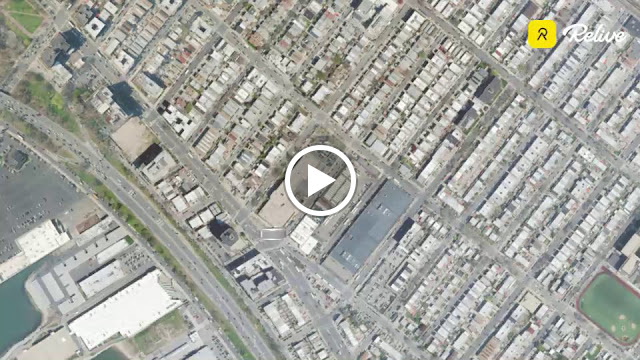
The teacher's last name is Ford and there is a street not too far from me by the same name. I wanted to do my run there, so I can name the run FORD BY FORD, but it is not close enough to walk over and would require a bus ride or a car drive. Social distancing was already announced then so I decide to do it in my own neighborhood. Little did I know that run would be one of my last runs for the immediate future. These days I do rope-skipping in the backyard in the morning, then some time after lunch it's yoga in the dining room, both activities are done with my son. Last but not least, I would do a mile or three on the elliptical in the living room.
Hope you enjoy this little Relive video of my Ford run! Relive now offer for free one music track to add, sorry that's the best I can do. After the run, I regretted that I didn't use kerning to keep the rest of letters closer the F. Oh well!
18 March 2020
TERRANCE QUARANTINO
Coming soon to a screen near you, the long-awaited Kill Bill: Volume 3 by yours truly! It's my life-long dream to direct it and now that I, for all intent and purpose, have no job, no public library to go to, cannot even go out for a run, I have plenty of time and with today's technology, a movie can be made with just a smartphone and one person playing many different roles. I already have an alias to go with the movie - Terrance Quarantino!
Seriously, I have no plan to direct any movie during this self-quarantine period many residents of New York City are going through. No, I have no signs of infection, just no job because the place I worked have most people work from home. Being a contractor doing physical computer setup, there's no future for me when this pandemic struck. Normally I would spend a lot of time at the public library but that too is closed. At first Brooklyn Public Library announced that they would operate at reduced hours, something like 1 P.M. to 6 P.M. and closed on the weekends. Shortly after, it was announced that all Brooklyn libraries would just shut down. Not that I would travel that far, but same thing for Queens and NYPL (which covers Manhattan, The Bronx, and Staten Island). So what's left to do? Again, the normal thing, oh not so long ago, would be to go for a run. I'm a slow runner but I can do a few miles out then back. Ten miles, eight miles, whatever, something to do to take one's mind off the pressing matters. Not anymore. Now the outdoor is a dangerous place, you don't know who can infect you. Who knows, soon we may be in lockdown mode like some other cities.
Time to hunker down and stay at home as much as possible. Here's what I plan to do:
Seriously, I have no plan to direct any movie during this self-quarantine period many residents of New York City are going through. No, I have no signs of infection, just no job because the place I worked have most people work from home. Being a contractor doing physical computer setup, there's no future for me when this pandemic struck. Normally I would spend a lot of time at the public library but that too is closed. At first Brooklyn Public Library announced that they would operate at reduced hours, something like 1 P.M. to 6 P.M. and closed on the weekends. Shortly after, it was announced that all Brooklyn libraries would just shut down. Not that I would travel that far, but same thing for Queens and NYPL (which covers Manhattan, The Bronx, and Staten Island). So what's left to do? Again, the normal thing, oh not so long ago, would be to go for a run. I'm a slow runner but I can do a few miles out then back. Ten miles, eight miles, whatever, something to do to take one's mind off the pressing matters. Not anymore. Now the outdoor is a dangerous place, you don't know who can infect you. Who knows, soon we may be in lockdown mode like some other cities.
Time to hunker down and stay at home as much as possible. Here's what I plan to do:
- Work on maintaining a Facebook group for alumni of Newtown High School (Elmhurst, Queens, NY). If you attended that school and don't yet know about it, check it out at https://www.facebook.com/groups/47486807610/
- Resume maintaining a family tree that I started some years ago. It is a lot of work, with people dying, being born, getting married etc, it needs updating every so often. Well, for the immediate future, I do have time.
- With the library closed, one of my source of entertainment is no longer available. Sure, Overdrive is available for digital content but I'm an old-school guy, I still watch movies on DVDs and such. A sister of mine left a box or two of VHS tapes in my attic, I might watch some of those old movies after all.
- Last but not least, this blog needs more regular posting. Facebook et al are nice but can be so chaotic sometimes. I like to go back to old materials every now and then. A blog is good for that. It's just me and my own stuff, no need to wade through pages and pages of other people's stuff.
Hang on, COVID Cave-Dwellers!
27 January 2020
THAT'S AMORE
The past few years for Valentine's Day, I led a group run that spells out something related to that over-commercialized event. The first year it was "LOVE", the following it was also "LOVE" but packed into a neat little square, in the style of that famous Robert Indiana sculpture. Last year, it was "I {heart} U", where the heart symbol was where the {heart} is. A Facebook memory reminded me, belatedly, that this year it should be "xoxo". I said "belatedly" because I totally forgot about it and already designed the route to spell "amore", the Italian word for love. It could have been the Spanish word "amor" but because of that Dean Martin song I went with "amore". The little pun about "a moray" (eel) and "amore" is one of my favorites, so "amore" it is.
The route makes no use of any special skill with pausing and unpausing of GPS watch or smartphone app. I am tempted to throw in one, though, to make the top of the "r" better show the arch at the top of that letter. It'll be an optional thing. If you don't do it, the letter still looks like an "r".
9:30 A.M. Saturday 15 February 2020
Bartel-Pritchard Square
Brooklyn, NY
We'll walk to the green dot on the "a", without activating watch or smartphone app, then start from there. Event is open to the public, so do come if you are in the neighborhood. I'll be on the traffic circle of Bartel-Pritchard a little before 9:30.

The route makes no use of any special skill with pausing and unpausing of GPS watch or smartphone app. I am tempted to throw in one, though, to make the top of the "r" better show the arch at the top of that letter. It'll be an optional thing. If you don't do it, the letter still looks like an "r".
9:30 A.M. Saturday 15 February 2020
Bartel-Pritchard Square
Brooklyn, NY
We'll walk to the green dot on the "a", without activating watch or smartphone app, then start from there. Event is open to the public, so do come if you are in the neighborhood. I'll be on the traffic circle of Bartel-Pritchard a little before 9:30.

01 December 2019
SAYONARA FULL MENORAH, HELLO SEMI-NORAH
On Sunday December 22 of this year, 9:30 A.M., I will be at Grand Army Plaza in Brooklyn, corner of Union Street and Prospect Park West (PPW), to lead a run that draws a menorah. I did a test run today, but I was not in the right frame of mind to do the entire menorah, just the left-half, or what I call a semi-norah. As in semicircle.
The design called for about 8 miles, today's run came out to about 4 miles, so that's about right. The original 8 miles didn't include a base, so I added it today but it still looks not wide enough.
For the official run, I re-designed the route to have narrower distances between the branches, shorter stem, and wide stem, all resulting in the shorter distance of six miles.
Lastly, check out the video made via Relive.cc. Because of some disagreement between Relive.cc and Strava, I had to use Runkeeper, which weirdly didn't show the run to Relive.cc. I had to log into Runkeeper on a computer and export the route to GPX then import that into Relive.cc, again on a computer.
The run is made for the Prospect Park Track Club but as with most, if not all, PPTC events, the run is open to the public. If route art is your interest, come join me on Sunday Dec 22 at 9:30 A.M., Union Street and PPW.


The design called for about 8 miles, today's run came out to about 4 miles, so that's about right. The original 8 miles didn't include a base, so I added it today but it still looks not wide enough.
For the official run, I re-designed the route to have narrower distances between the branches, shorter stem, and wide stem, all resulting in the shorter distance of six miles.
Lastly, check out the video made via Relive.cc. Because of some disagreement between Relive.cc and Strava, I had to use Runkeeper, which weirdly didn't show the run to Relive.cc. I had to log into Runkeeper on a computer and export the route to GPX then import that into Relive.cc, again on a computer.
The run is made for the Prospect Park Track Club but as with most, if not all, PPTC events, the run is open to the public. If route art is your interest, come join me on Sunday Dec 22 at 9:30 A.M., Union Street and PPW.


24 November 2019
MISSED OPPORTUNITY: VETERANS DAY 2019
This past Veterans Day I had to go to work. I usually do, the places I worked at don't observe the holiday so it's not that different this year. What is slightly different is that as we had a meeting in a big conference room, someone asked if anyone present is a veteran. There were some and we thanked them for their service to the nation. I wanted to crack a joke but all I could come up was that I was a veteran of the Battle of the Sexes. Not even a veteran of some war, lame. Only days later that I came up with the following "Wars" to jokingly claim to be a veteran of:
- The Browsers War. Remember that one, when the world wide web first came into being? It was Netscape Navigator against Microsoft's Internet Explorer
- The Cola War. Coke vs. Pepsi. Even rock-n-roll got involved, I can't take it anymore.
- The War on Drugs. I don't do drugs, nothing to add here. Maybe too serious and not belongs here.
- The War on Poverty. I lost that one, still not Rich, may even be heading to Poor. Too serious, too, but a tad not as serious as Drugs.
- The Platform War. Mac vs. PC. Or should that be GUI War? Finder vs. Windows 95?
What other not-so-serious Wars can be included?
07 November 2019
TWIST TIES AND SHOUT
Part of my job the past few years involves opening boxes containing new computer equipment. The pieces often come with cables that are held together with twist ties. Said twist ties are thrown away by most, if not all, of my colleagues. I am sure most people do that too. I just cannot stand seeing something perfectly re-usable being thrown away. Most of the time I save them but then I don't use them fast enough. What to do with all these twist ties? I try to find uses for them and just yesterday found an innovative way to.
I had a need to find out, among the many cables going down a grommet hole, if a particular cable goes to a particular computer. The area where the cables go through is dark and tight. Some of the cables are tightened with zip ties such that they cannot be pulled much. I hate zip ties! In my last job, I know a guy who tried to cut a zip tie with a knife and ended up putting a big gash on his forearm. Zip ties should be banned! Anyway, back to my cabling woe. So I couldn't tug on the cable I was working with to see where it goes. And it's dark back behind the desk. I happened to have a twist tie attached to my ID lanyard. I wrapped the twist tie around the cable and slowly push it down the grommet hole, along the suspect cable, until I was able to catch it. Voila! It indeed connected to the computer I suspected it would.
I had a need to find out, among the many cables going down a grommet hole, if a particular cable goes to a particular computer. The area where the cables go through is dark and tight. Some of the cables are tightened with zip ties such that they cannot be pulled much. I hate zip ties! In my last job, I know a guy who tried to cut a zip tie with a knife and ended up putting a big gash on his forearm. Zip ties should be banned! Anyway, back to my cabling woe. So I couldn't tug on the cable I was working with to see where it goes. And it's dark back behind the desk. I happened to have a twist tie attached to my ID lanyard. I wrapped the twist tie around the cable and slowly push it down the grommet hole, along the suspect cable, until I was able to catch it. Voila! It indeed connected to the computer I suspected it would.
22 October 2019
YAHOO! FREECYCLE => TRASH NOTHING
I share administration responsibilities for a Buy Nothing group on Facebook but occasionally I still check in with the two Yahoo! Freecycle groups I belong to. Big news! Yahoo! is essentially ending support for Yahoo!Groups!!!
Below is the info from the Freecycle New York City, which covers all five boroughs of NYC. I haven't checked out Trash Nothing but Yahoo!Groups I know is so clunky by 2019 standard. It is about time. So long Yahoo!Groups...
Below is the info from the Freecycle New York City, which covers all five boroughs of NYC. I haven't checked out Trash Nothing but Yahoo!Groups I know is so clunky by 2019 standard. It is about time. So long Yahoo!Groups...
We're happy to announce that New York City Freecycle is moving to the trashnothing.com site.
Sign up now at:
https://trashnothing.com/freecyclenewyorkcity
The new site makes freecycling quicker and easier with:
- group posts categorized & color coded by type (Offer, Want, ..)
- automatic removal of offers that are taken & wants that are received
- instant email alerts for items you're interested in
- all your group posts in one place
- it works great on phones & tablets
- simple photo galleries, spam protection & more!
See all the features at: https://trashnothing.com/freecyclenewyorkcity
Sign up now at:
https://trashnothing.com/freecyclenewyorkcity
The new site makes freecycling quicker and easier with:
- group posts categorized & color coded by type (Offer, Want, ..)
- automatic removal of offers that are taken & wants that are received
- instant email alerts for items you're interested in
- all your group posts in one place
- it works great on phones & tablets
- simple photo galleries, spam protection & more!
See all the features at: https://trashnothing.com/freecyclenewyorkcity
21 October 2019
谢谢你的爱
A pun may not be funny if it has to be explained but I'll take the chance so you may appreciate the punchline in the previous post. 谢谢你的爱 is the title of a popular song by Hong Kong superstar Andy Lau. It means Thank You for Your Love. In pinyin (the romanization of Chinese characters to make it easier for non-native people to read Chinese) the phrase is xie xie ni de ai. I readily associated the last three words as near the eye. Then at some point I thought of the catchphrase See Spot run from a series of children's book. So I got See + something that sounds like xie + near the eye, but what can that something be? President Xi of China was a good match, although I mean no offense to not refer to him as President. I could have drawn a cartoonish version of him, as opposed to the stick figure, but I want to avoid any misunderstood bad portrait of him. At one time, I thought of using the nickname of an old nurse in the news, See See, but given all the news about U.S.-China relations these days, President Xi makes more sense. Originally I was going to draw the Statue of Liberty, with different views of it as the helicopter buzzes about. It would be a lot of work. Luckily, a recent visit to the Statue got me a few photos that I was able to use as the backdrop edited in Gimp (the free alternative to Photoshop and its annoying subscription model).
So there you have, a pun in two languages, a bit convoluted, but it's definitely original. That's my style, I try to come up with original content.
So there you have, a pun in two languages, a bit convoluted, but it's definitely original. That's my style, I try to come up with original content.
20 October 2019
THANK YOU FOR YOUR LOVE
A pun for music fans of Hong Kong superstar Andy Lau.
 |
| This is the Statue of Liberty |
 |
| That is President Xi Jinping of China on a helicopter tour to view the Statue of Liberty |
 |
| See President Xi near the torch. |
 |
| See Xi near the crown. |
 |
| See Xi near the mouth. |
 |
| See Xi near the ear. |
 |
| See Xi near the nose. |
 |
| See Xi near the eye. |
12 October 2019
PINNED TEMPLATES
A few days ago, I wrote about using Office templates to make repetitive tasks easier to handle. The way Microsoft wants us to launch the template files, I don't like it at all. There are just too many clicks to go through. My approach is to save the template files somewhere easily reached, like Documents folder or top level of network home drive. Be sure to pin Outlook application to the Taskbar. Have Windows Explorer opened to where the template file lives. Right-click the template file and drag it onto the Outlook icon in the Taskbar, at which point the mouse pointer should mention Pin to Outlook. Let go. Next time you need to launch the template, right-click on the pinned Outlook icon and the template is right there at the top of the list, similar to what I have below. Click the item and you are ready to breeze through it.

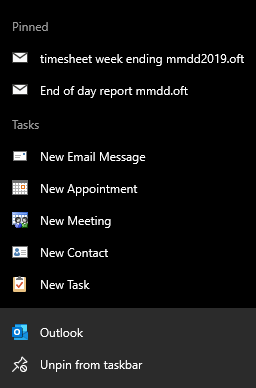
10 October 2019
GOOGLE MAPS WITH STRESS LEVEL?
Nowadays many of us depend so much on GPS devices or smartphone apps to guide us as we hurry from home to work or elsewhere. It's pretty good, how did we ever live without them? But they can be better. How often do you hear Google Maps say "There is an accident on So-and-so Turnpike and traffic is heavy but you are still on the fastest route"? Or when you look at the options for the few routes you can go from Point A to Point B, the highway option is dark red but is still somehow faster than the local route? I usually choose the local, slower option. Or whatever the other option that may not be the fastest. When there's an accident, if it's not too bad one lane of the say, three-lane highway is unusable. If you are unlucky to be stuck in that lane, you move slowly toward the wreck and then some a**hole in the next lane will try not to let you in, oh because they are so important. The stress in such situation must be high. Maybe some day we all will have biotech equipment on us that feeds the phone vital data like blood pressure etc and based on that the GPS app will also list stress level as a factor for taking so-and-so route. I know I hate to be stuck in bumper-to-bumper traffic on the highway so even if I have to stop at every red light on the local street, at least with that I can divert my eyes briefly from the sorry sight of traffic jam when I stop at red lights.
09 October 2019
TEMPLATE IN A TEACUP?
Every now and then I would meet a computer user who says he has some template file to help speed up some repetitive task. Microsoft Word may not be the best program to create forms but it does the job. In the case of said user, he would have some MS Word document, say Request-Form.docx. A bonafide MS Word file, that he opens, then erases a word here and there and enter the new information. Then he Save As some other names, say Request-12345.docx. I am such a stickler when it comes to language and terms, the idea of calling such a document a template annoys me to no end. That's not how a template is supposed to be. If one day he forgets to edit certain words, then the document is wrong. Hopefully it won't be some sensitive information that is sent to the wrong people, but it's a possibility. If the world is still all pen-and-paper like not so long ago, my user would be taking a completed form and use correction fluid to cover up the old info, wait for it to dry, then write in the new info. The electronic method is not as tedious, but you get the idea.
A real template file, or for simplicity's sake, template, is a file that when you open creates a new document, based on the template's name, with some number attached at the end. For example, if you have a template to contain Help Desk requests and name it HDRequest.dotx, when you double-click it you get a new file named HDRequest1.docx. While the first document is still open, if you double-click the template, it creates HDRequest2.docx, so on and so on. Let's say the request has some boxes to hold the requester's first name, last name, and contact number. You create the template with those fields empty. When you launch the template, the new document is also empty in those fields. Whatever you do or not do to the new document, nothing will reflect in the template because the new document and the template are two different files. Not so with the crummier method that I described in the beginning. Let's say you open some faux template and filled in some fields, then instead of saving under a different name, you use the same name and unwittingly select Yes when asked to confirm the overwrite. Your faux template has been changed, unintentionally. You will have to re-create it by removing certain words etc until it's back to its original format.
Many programs support the use of template. We already saw the example with Microsoft Word. Excel has it, so does PowerPoint, and Outlook too. Let's create a template in Outlook and see how it's used.
 Let's say everyday you need to send an email to the four messieurs as shown above, about some repetitive topic, of course. You create a new message as usual, enter Mr. Fahrenheit and Mr. Fancy Pants in To field, then Mr. Magoo and Mr. Ed in the Cc field, some meaningful Subject, and finally something useful in the body of the message. If you already have signature auto-appended to all your new message, do not include the signature in the template. For example, if my signature already includes Qaptain Qwerty and the easy-to-remember phone number, an Outlook template like that above will generate a repeat of the name and phone.
 Save the "message" and choose the format to be Outlook Message Format - Unicode (*.msg). When you select Outlook Message Format, the location the file is saved is automatically set to the user's Appdata\Roaming\Microsoft\Template .
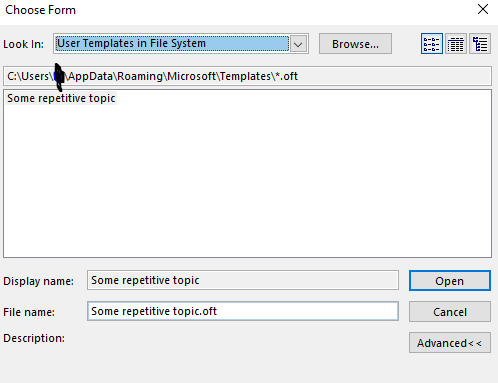
To use the template, the way Microsoft wants you to, as seen in Outlook Help, is tedious. You have to click New Mail / More Items / Choose Forms / Users Templates in File System . I think I have a better system, but I'll save the tip for the next blog entry.
A real template file, or for simplicity's sake, template, is a file that when you open creates a new document, based on the template's name, with some number attached at the end. For example, if you have a template to contain Help Desk requests and name it HDRequest.dotx, when you double-click it you get a new file named HDRequest1.docx. While the first document is still open, if you double-click the template, it creates HDRequest2.docx, so on and so on. Let's say the request has some boxes to hold the requester's first name, last name, and contact number. You create the template with those fields empty. When you launch the template, the new document is also empty in those fields. Whatever you do or not do to the new document, nothing will reflect in the template because the new document and the template are two different files. Not so with the crummier method that I described in the beginning. Let's say you open some faux template and filled in some fields, then instead of saving under a different name, you use the same name and unwittingly select Yes when asked to confirm the overwrite. Your faux template has been changed, unintentionally. You will have to re-create it by removing certain words etc until it's back to its original format.
Many programs support the use of template. We already saw the example with Microsoft Word. Excel has it, so does PowerPoint, and Outlook too. Let's create a template in Outlook and see how it's used.


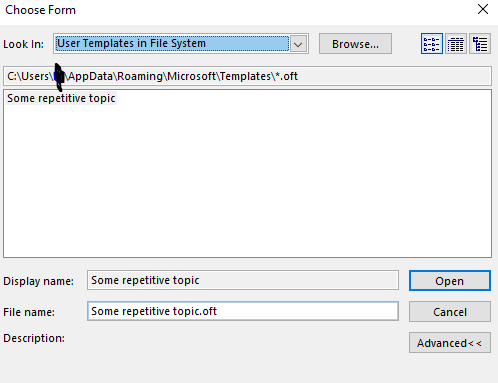
To use the template, the way Microsoft wants you to, as seen in Outlook Help, is tedious. You have to click New Mail / More Items / Choose Forms / Users Templates in File System . I think I have a better system, but I'll save the tip for the next blog entry.
08 October 2019
IF FOUND PLEASE CALL OWNER
This past Saturday, I found an LG smartphone in the municipal parking lot by the New Utrecht Branch of the Brooklyn Public Library. I have a knack for finding lost items, probably because I keep my eyes on the ground to avoid tripping or stepping on undesirable stuff. One time, the iPhone I found had no lock whatsoever so I was able to someone who recently had a conversation with the owner. Another, I cannot recall how I did, maybe I said "Call home", and was able to connect to someone the owner knew. This time, the phone was locked by fingerprint so I was stumped. I think I pressed the unlock button one too many times eventually I was offered the chance to unlock by passcode, which of course I failed. The phone started to go dim and it took me a few minutes to realize that its power was low. 4%!!! Luckily, I had a micro-USB cable in my car so I was able to power it. I don't know if it's because the phone now had a steady supply of power, but it showed the message "If found please call owner" with a button, I think, below to press. I tried that and was connected to "Mom", who couldn't meet me soon but told me to drop it off with an Alex in the nearby eyeglass store. By now the phone and its owner should be re-united.
It's such a good idea to have the ability to call someone related to the owner of a smartphone, all from the lock screen. Granted the average person would try to wipe a found phone or make some bucks out of the incident. Yes, I am pessimistic. But on the off-chance that some decent human being find a phone, why not make it easier to have it returned. Of course, you would not set the function to call the phone itself, what's the point, right? You would set it to call your next-of-kind, or your room-mate, someone nearby.
I tried to find out how such function can be had but have no success. The low-tech method is to design the lock screen background to have the message "Call owner if found at so-and-so number". I think I used to have my wife's phone number affixed somewhere on my phone, another low-tech solution. At the other end, I found some enterprise app that can remote-wipe a phone, plus showing the If-found message, among other functions. I think what I encountered was done via some Android apps but for the life of me, I couldn't find it. You would think Google knows everything, but not always. Maybe someone in the blogosphere can educate me?
It's such a good idea to have the ability to call someone related to the owner of a smartphone, all from the lock screen. Granted the average person would try to wipe a found phone or make some bucks out of the incident. Yes, I am pessimistic. But on the off-chance that some decent human being find a phone, why not make it easier to have it returned. Of course, you would not set the function to call the phone itself, what's the point, right? You would set it to call your next-of-kind, or your room-mate, someone nearby.
I tried to find out how such function can be had but have no success. The low-tech method is to design the lock screen background to have the message "Call owner if found at so-and-so number". I think I used to have my wife's phone number affixed somewhere on my phone, another low-tech solution. At the other end, I found some enterprise app that can remote-wipe a phone, plus showing the If-found message, among other functions. I think what I encountered was done via some Android apps but for the life of me, I couldn't find it. You would think Google knows everything, but not always. Maybe someone in the blogosphere can educate me?
07 October 2019
BRING NYC BACK
Bring it back, bring it back
Don't take it away from me because you don't know
What it means to me...
CityStrides recently had a major overhaul. Lots of cities are now recognized so there is no need to individually request for them to be added. Streets are now all real streets and not highways, buildings, bodies of water, etc. Some streets that were mistakenly removed for being confused with Creeks or highway-style Turnpike were added back. Examples are Cromwell Crescent in Rego Park and Union Turnpike, which is mostly an avenues with lots of traffic lights and red-light camera, but definitely not a real turnpike like Massachessetts Turnpike or Pennsylvannia Turnpike.
It was a bit scary for a few days to see all my ranking went low, like 4% complete instead of, say, 25%, for some given city. I waited for it to be fixed but in the end had to write to Mr. CityStrides and now all is good. Except that now there is no New York City (NYC) as an entity in itself. In its place, not exactly the same, we have the five boroughs - The Bronx, Manhattan, Queens, Brooklyn, and Staten Island. Plus, in Manhattan there are further breakdown of the the island-city into Manhattan Community Boards xyz. I was really happy with my #1 position in NYC but now I have to settle with being #1 in The Bronx, Queens, and Staten Island. All meaningless really, just bragging right, and nothing of real value. Hopefully some day when things settled with this major overhaul, NYC will be brought back and the many Manhattan Community Boards will be abolished. OK, it's not really Love of My Life we are talking about here but it's still nice to have it back.
Don't take it away from me because you don't know
What it means to me...
CityStrides recently had a major overhaul. Lots of cities are now recognized so there is no need to individually request for them to be added. Streets are now all real streets and not highways, buildings, bodies of water, etc. Some streets that were mistakenly removed for being confused with Creeks or highway-style Turnpike were added back. Examples are Cromwell Crescent in Rego Park and Union Turnpike, which is mostly an avenues with lots of traffic lights and red-light camera, but definitely not a real turnpike like Massachessetts Turnpike or Pennsylvannia Turnpike.
It was a bit scary for a few days to see all my ranking went low, like 4% complete instead of, say, 25%, for some given city. I waited for it to be fixed but in the end had to write to Mr. CityStrides and now all is good. Except that now there is no New York City (NYC) as an entity in itself. In its place, not exactly the same, we have the five boroughs - The Bronx, Manhattan, Queens, Brooklyn, and Staten Island. Plus, in Manhattan there are further breakdown of the the island-city into Manhattan Community Boards xyz. I was really happy with my #1 position in NYC but now I have to settle with being #1 in The Bronx, Queens, and Staten Island. All meaningless really, just bragging right, and nothing of real value. Hopefully some day when things settled with this major overhaul, NYC will be brought back and the many Manhattan Community Boards will be abolished. OK, it's not really Love of My Life we are talking about here but it's still nice to have it back.
Subscribe to:
Posts (Atom)