Showing posts with label automation. Show all posts
Showing posts with label automation. Show all posts
03 April 2020
LEARN WITH MAC GEEK GAB
I regularly listen to the Mac Geek Gab podcast. Cool intro music but what I like the most are the quick tips etc. Mind you, most of the time I cannot apply the tips but it's still good to know. My Mac is not at the latest and greatest version of Mac OS X so those tips simply don't apply. Other tips like WiFi meshing or RAID setup also don't help because I don't have the hardware. At least not yet. They do talk about iDevice's iOS and I finally found an applicable tip, namely the Shortcuts app for iPhone and such. It's sort of like programming for the masses. I haven't done much with it but quickly cobbled together two Shortcuts "scripts". One is to turn off Bluetooth then turn on Low Power Mode. I name it Save Energy. Supposedly I should use that script each night before going to bed. In the morning, I would run the Normal Energy script, which undoes those settings. Just something to explore the Shortcuts app. There is an Automation portion of Shortcuts that I haven't explored. Logically, these scripts should run automatically at certain time of the day, as long as the iPhone is on. Something else I will explore is what to play or act when the iPhone sees my car's Bluetooth system. Happy Exploring!
09 October 2019
TEMPLATE IN A TEACUP?
Every now and then I would meet a computer user who says he has some template file to help speed up some repetitive task. Microsoft Word may not be the best program to create forms but it does the job. In the case of said user, he would have some MS Word document, say Request-Form.docx. A bonafide MS Word file, that he opens, then erases a word here and there and enter the new information. Then he Save As some other names, say Request-12345.docx. I am such a stickler when it comes to language and terms, the idea of calling such a document a template annoys me to no end. That's not how a template is supposed to be. If one day he forgets to edit certain words, then the document is wrong. Hopefully it won't be some sensitive information that is sent to the wrong people, but it's a possibility. If the world is still all pen-and-paper like not so long ago, my user would be taking a completed form and use correction fluid to cover up the old info, wait for it to dry, then write in the new info. The electronic method is not as tedious, but you get the idea.
A real template file, or for simplicity's sake, template, is a file that when you open creates a new document, based on the template's name, with some number attached at the end. For example, if you have a template to contain Help Desk requests and name it HDRequest.dotx, when you double-click it you get a new file named HDRequest1.docx. While the first document is still open, if you double-click the template, it creates HDRequest2.docx, so on and so on. Let's say the request has some boxes to hold the requester's first name, last name, and contact number. You create the template with those fields empty. When you launch the template, the new document is also empty in those fields. Whatever you do or not do to the new document, nothing will reflect in the template because the new document and the template are two different files. Not so with the crummier method that I described in the beginning. Let's say you open some faux template and filled in some fields, then instead of saving under a different name, you use the same name and unwittingly select Yes when asked to confirm the overwrite. Your faux template has been changed, unintentionally. You will have to re-create it by removing certain words etc until it's back to its original format.
Many programs support the use of template. We already saw the example with Microsoft Word. Excel has it, so does PowerPoint, and Outlook too. Let's create a template in Outlook and see how it's used.
 Let's say everyday you need to send an email to the four messieurs as shown above, about some repetitive topic, of course. You create a new message as usual, enter Mr. Fahrenheit and Mr. Fancy Pants in To field, then Mr. Magoo and Mr. Ed in the Cc field, some meaningful Subject, and finally something useful in the body of the message. If you already have signature auto-appended to all your new message, do not include the signature in the template. For example, if my signature already includes Qaptain Qwerty and the easy-to-remember phone number, an Outlook template like that above will generate a repeat of the name and phone.
 Save the "message" and choose the format to be Outlook Message Format - Unicode (*.msg). When you select Outlook Message Format, the location the file is saved is automatically set to the user's Appdata\Roaming\Microsoft\Template .
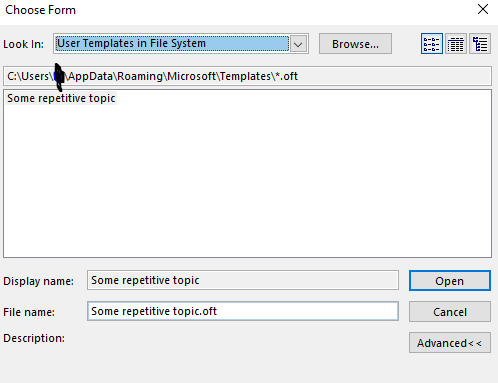
To use the template, the way Microsoft wants you to, as seen in Outlook Help, is tedious. You have to click New Mail / More Items / Choose Forms / Users Templates in File System . I think I have a better system, but I'll save the tip for the next blog entry.
A real template file, or for simplicity's sake, template, is a file that when you open creates a new document, based on the template's name, with some number attached at the end. For example, if you have a template to contain Help Desk requests and name it HDRequest.dotx, when you double-click it you get a new file named HDRequest1.docx. While the first document is still open, if you double-click the template, it creates HDRequest2.docx, so on and so on. Let's say the request has some boxes to hold the requester's first name, last name, and contact number. You create the template with those fields empty. When you launch the template, the new document is also empty in those fields. Whatever you do or not do to the new document, nothing will reflect in the template because the new document and the template are two different files. Not so with the crummier method that I described in the beginning. Let's say you open some faux template and filled in some fields, then instead of saving under a different name, you use the same name and unwittingly select Yes when asked to confirm the overwrite. Your faux template has been changed, unintentionally. You will have to re-create it by removing certain words etc until it's back to its original format.
Many programs support the use of template. We already saw the example with Microsoft Word. Excel has it, so does PowerPoint, and Outlook too. Let's create a template in Outlook and see how it's used.


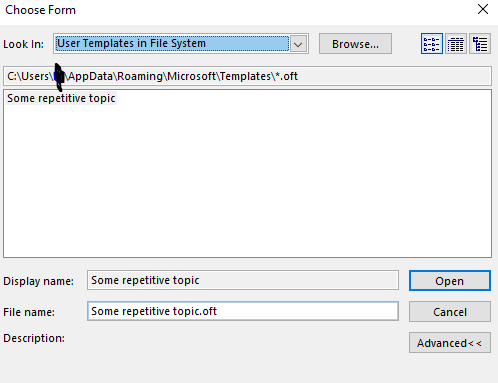
To use the template, the way Microsoft wants you to, as seen in Outlook Help, is tedious. You have to click New Mail / More Items / Choose Forms / Users Templates in File System . I think I have a better system, but I'll save the tip for the next blog entry.
19 September 2012
NYRR BX 10M, PART 2: THE GRAND CONCOURSE, PARKING FAIL
A big chunk of the 2012 NYRR Bronx 10-Mile took place on the Grand Concourse. Having lived in Brooklyn for the past 15 years, I think of the Grand Concourse as the Bronx's Ocean Parkway, without the nice tree shades. I actually lived in the Bronx for a few months in early 1980, in the Kingsbridge part, not too far from where Fordham Road meets the Concourse. Alexander's department store used to be there, then it got replaced by Caldor's, who knows what's at the corner now. I, perhaps along with other Vietnamese, think of Grand Concourse as "răng con cọp", or "tiger's teeth", purely because the consonants in the phrase sound similar, i.e. R.C.C.
A few people complained that the Grand Concourse was boring. I think it is fine. You need a wide boulevard so people can run in both directions, while the cars still can use the service roads. NYRR is an NYC-based group so its races have to be urban runs, along city streets, in the canyons overshadowed by tall buildings.
The race started off near Joyce Kilmer Park, up the Grand Concourse then at Moshulu Parkway made a left toward that school complex consisting of Lehman College and Bronx Science High School. The 2012 race was my second visit to the area and I still don't know where Bronx Science is. I've heard so much about it, I would like to at least take a photo of its front door. However, during both visits I was there to run a race and there was no time to stop and take photos. Actually, with the Bronx Half in 2010 I did not care too much about my finish time and did stop to take photos, but not of Bronx Science. Anyway, a turn here and there and the runners were back on Moshulu heading east, then turn around at some point to head west then back on Grand Concourse for the long stretch to the finish line.
I recalled that the start was around 161st Street and Moshulu was around 200th Street, so there should be only 40 or so blocks to go, no? If 20 blocks equal one mile, then there would be just 2 miles to go once we were back on Grand Concourse. I looked forward to each intersection but they seemed so far apart yet the street numbers went up by only one. As I learned later on, these Bronx streets don't follow the 20-block rule. They are much further apart. Indeed, the return trip on Grand Concourse was 3.5 miles, not 2.
Something nice with the return trip on the Grand Concourse was that I bumped into Mr. James Lu, the 74-year-old runner featured in this video, http://vimeo.com/42746005 . I saw him before after many other NYRR races but did not know his history or his name. He certainly was a unique character. At the Bronx 10M, I greeted him by name as I ran by him. At the water station we both stopped but afterward I took off before him. It is nothing to brag about to beat someone 30 years older but it had to be done, as the alternative would be worse. I'm sure other older runners beat me to the finish line, but I did what I could.
As I walked to the garage, the sight of people queuing up to pay at the ticket machine was discouraging. I was not too tired from the 10-mile run but standing on line for a long time was not something I wanted to do. Out of the 3 machines near the entrances I entered through, one was out-of-order. I walked over to the other entrance, where another 3 machines stood and the line was not too long. It turned out one of the machines was also broken. The one on the left supposedly would only take credit card only. I was on a queue that supposedly could use either cash or credit card. One runner did not have a credit card so he asked me to switch with him and I did. Then it turned out he did not have enough small bills to pay the $8 fee. I could have changed it for him but just to be safe I told him let me finish my transaction first. It was a good, lucky move, as I discovered shortly afterward the credit card reader was not working and people before me had to pay cash. Adding injury to insult, the machine did not give change either. I think one or two people inserted $20 or $10 bills and got nothing in return. Later on I saw one of the 2 parking staff walking around with wads of bills, maybe they were going to refill the the machine.
When I got to the machine, I had enough small bills to cover my $8 and had some bills left. A woman behind me only had $5 so I gave her $3 in singles. She wanted to know how she would pay me back but I told her to give it to charity when she gets around to it. Pay it forward, that's how I like to do things sometimes. Random act of kindness, too, I'd like to think that was. Automation is great to some extent but when it does not work and there are no humans around it's a total pain in the ass. I never drove to Yankee Stadium so I never park there. I wonder how bad it would be when there was a game and these dang machines don't work properly. Hopefully next time, if there will be one, the parking company can do a better job at serving the runners community.
A few people complained that the Grand Concourse was boring. I think it is fine. You need a wide boulevard so people can run in both directions, while the cars still can use the service roads. NYRR is an NYC-based group so its races have to be urban runs, along city streets, in the canyons overshadowed by tall buildings.
The race started off near Joyce Kilmer Park, up the Grand Concourse then at Moshulu Parkway made a left toward that school complex consisting of Lehman College and Bronx Science High School. The 2012 race was my second visit to the area and I still don't know where Bronx Science is. I've heard so much about it, I would like to at least take a photo of its front door. However, during both visits I was there to run a race and there was no time to stop and take photos. Actually, with the Bronx Half in 2010 I did not care too much about my finish time and did stop to take photos, but not of Bronx Science. Anyway, a turn here and there and the runners were back on Moshulu heading east, then turn around at some point to head west then back on Grand Concourse for the long stretch to the finish line.
I recalled that the start was around 161st Street and Moshulu was around 200th Street, so there should be only 40 or so blocks to go, no? If 20 blocks equal one mile, then there would be just 2 miles to go once we were back on Grand Concourse. I looked forward to each intersection but they seemed so far apart yet the street numbers went up by only one. As I learned later on, these Bronx streets don't follow the 20-block rule. They are much further apart. Indeed, the return trip on Grand Concourse was 3.5 miles, not 2.
Something nice with the return trip on the Grand Concourse was that I bumped into Mr. James Lu, the 74-year-old runner featured in this video, http://vimeo.com/42746005 . I saw him before after many other NYRR races but did not know his history or his name. He certainly was a unique character. At the Bronx 10M, I greeted him by name as I ran by him. At the water station we both stopped but afterward I took off before him. It is nothing to brag about to beat someone 30 years older but it had to be done, as the alternative would be worse. I'm sure other older runners beat me to the finish line, but I did what I could.
As I walked to the garage, the sight of people queuing up to pay at the ticket machine was discouraging. I was not too tired from the 10-mile run but standing on line for a long time was not something I wanted to do. Out of the 3 machines near the entrances I entered through, one was out-of-order. I walked over to the other entrance, where another 3 machines stood and the line was not too long. It turned out one of the machines was also broken. The one on the left supposedly would only take credit card only. I was on a queue that supposedly could use either cash or credit card. One runner did not have a credit card so he asked me to switch with him and I did. Then it turned out he did not have enough small bills to pay the $8 fee. I could have changed it for him but just to be safe I told him let me finish my transaction first. It was a good, lucky move, as I discovered shortly afterward the credit card reader was not working and people before me had to pay cash. Adding injury to insult, the machine did not give change either. I think one or two people inserted $20 or $10 bills and got nothing in return. Later on I saw one of the 2 parking staff walking around with wads of bills, maybe they were going to refill the the machine.
When I got to the machine, I had enough small bills to cover my $8 and had some bills left. A woman behind me only had $5 so I gave her $3 in singles. She wanted to know how she would pay me back but I told her to give it to charity when she gets around to it. Pay it forward, that's how I like to do things sometimes. Random act of kindness, too, I'd like to think that was. Automation is great to some extent but when it does not work and there are no humans around it's a total pain in the ass. I never drove to Yankee Stadium so I never park there. I wonder how bad it would be when there was a game and these dang machines don't work properly. Hopefully next time, if there will be one, the parking company can do a better job at serving the runners community.
Subscribe to:
Posts (Atom)