24 December 2024

SURF TO YOUR HEART'S CONTENT

 These days (around December 2024), a regular announcement on the NYC subway is about subway surfing.  Someone claiming to be a teenager would say that subway surfing - the act of standing on the roof of a moving subway car - is uncool and definitely unsafe.  That it can kill you.  I don't know how effective that is, to have someone supposedly your peer, but not someone you know personally, to tell you subway surfing is unsafe.  It is totally stupid but kids, many of them, are stupid and will do stupid things.  I have an idea that probably can never be put into practice but let me outline it anyway.

A different, common occurrence in the subway system is people getting onto the track to retrieve things they accidentally dropped there.  It is not too difficult to hop onto the track, but it is really difficult to climb back onto the platform.  Sure, I haven't actually done it, but the typical subway rider doesn't have the upper body strength to easily pull themself up onto the platform.  News stories with happy ending reveal that some Good Samaritans aided the daredevil.  Unhappy stories, well, another life lost over something that may not even be that valuable.

My idea is to build a wall somewhere publicly accessible, with MTA personnel guarding it, and let wannabe daredevils take a shot at it.  With our litigious society, the wannabes would be required to sign some waiver, in case they fall off the wall.  But let them try, most probably won't make it, and in real life would become a death statistic in the subway system.  Publicize such events.  Maybe it's in some wide open space in the subway system, maybe at some local park.  Back to subway surfing.  Same idea, but now make it a subway car, maybe even re-use some real one.  Simulate the motion, low beams, tunnel entrance etc.  Make it seems real, but with foam of course.  Let the stupid kids, under supervision, tackle the challenge, with waivers etc.

Of course it won't happen.  There is no money for it, or at least there's no money for it until the MTA is properly audited and money waste is no longer a thing.  Stupid kids would think it is uncool to even try, better to do something really stupid, and if they don't die, boast about it. 
07 December 2024

HOW TO DRIVE IN THE SUPERMARKET

 Adulting has been difficult for both my wife and I.  We need more food and vegetables but no time to go get them.  We finally carved out some time to go to the nearby J-mart Chinese Supermarket on 18th Avenue in Brooklyn where the Waldbaum's used to be.  Many people living in the area had the same idea.

There was a short queue to get into the parking lot, which is somewhat unusual.  But it is the holiday season and the weekend, people need to stock up on supplies for the many banquets and parties in the upcoming weeks.  I got lucky and found a spot right by the edge, the other driver left his spot and I just had to skedaddle right in, no need to make a turn or anything fancy.  Gathered our many reusable bags and away we went.

The parking was busy so of course the inside was chaotic too.  It would be great if people would be more mindful how they drive the shopping carts and how to park them.  Don't block the aisle, don't make your fellow shoppers zigzag through the aisle.  If you have to park, at least look for existing blocker and be on the same side as the blocker.  There usually are some garbage bin for the staff to pick through the produce to get rid of bad parts etc.  Or a stack of bins of produce that is ready to be put out as soon as the stuff is all picked up by customers.  Any time I see a busy aisle in a big box store, with stuff all over and there is little room for customers to walk around, I painfully recall CompUSA, in particular the one on Fifth Avenue near 42nd Street.  What an unpleasant experience that was!

Anyway, sadly, the way some people drive or park their shopping carts inside a supermarket is probably the same way they drive cars on the street.  Just park anywhere that's convenient for them.  Why move a few yards ahead when there's a double-park spot right in front of their house.  Sure, there is another car double-parking on the other side too, people will just have to zigzag around the two cars.

01 December 2024

Bravo, Brother!

 I recently upgraded my Internet service and the change came with a new router.  Everything in the house that relied on a network connection to work had to be re-configured.  The cell phones were easy, there was even a QR code for scanning, but I did it the old-fashioned way.  All the computers didn't have much problem.  Then came the Brother Black & White printer, model HL2250DW.  I vaguely recalled last time I configured it, some AOSS protocol was involved.  Supposedly by pressing some AOSS button on the router, the printer would automatically joined the new wireless network.  Perhaps AOSS is no longer fashionable, I don't see anything on the new router that has anything to do with AOSS.  I should point out too that the new Verizon router is very stingy with Ethernet ports  There are only three now.  So there seems to be no way to make the Brother printer join the network, to be available as a wireless printer.  It does have a network port so I connected that to the new router.  Nothing lit up at both ends.  Hmm, just my luck the printer's network port somehow doesn't work.  I happened to have an Apple Time Capsule, which used to be my backup device but it's been supplanted by other devices.  What is good with the Time Capsule is that it has a USB port, connect a printer to it and voila the printer is available on the network.  To the Mac devices, that is.  I think it works over AirPrint technology, which is standard with Mac machines.  My wife uses a Lenovo Windows 11 laptop primarily, so I need to make the Lenovo see the wireless printer somehow.  I installed Bonjour Service and almost splurge $5 to buy some AirPrint program via Microsoft Store.  All the bad reviews changed my mind.  So the approach with Time Machine is a no-go.

I gave the Brother printer manual another read and there is a section about temporarily using a USB connection to join the printer wirelessly to a network.  And it actually worked!  Bravo, Brother, I don't know how that worked but it just worked!

02 January 2022

LIFE DURING PANDEMIC, JANUARY 2022

 My son thought it was a good idea to have COVID testing done to make sure he's not infected, even though we just had a test about a week ago.  Negative result, whew.  A little bird told me to try the simple, walk-in service at Nathan's Pharmacy at the corner of Bath and 19th Avenues.  Alas, it was closed, possibly because it was Sunday, maybe more so because it was the New Year weekend.  Once or twice I saw some testing van by Calvert Playground so I made a trip there.  Alas, no van.  It was there when I needed it, not there now when I wanted it to be there.  I pulled into a parking spot and searched for "COVID testing near me" in Google Maps app.  I already had my preference for the Brooklyn Army Terminal (B.A.T.), so that was all I could see, in particular a LabQ site in the area.  The site was listed as the LabQ office on some floor in Building A.  I went there once before.  They weren't supposed to take any patience that day, so I was told, but they were nice enough to take me in.  Mobilize to the B.A.T., let's go!


Street parking wasn't readily available as usual.  Cars were double-parked near the few queues in the area.  I decided to park on the pier for once.  There was plenty of room.  A short walk over to Building A and there was a sign on the door that told us to use their Mobile Service on First Avenue between 57th and 58th Streets.  It had to be Rapid Testing because the line went around the block.  Just a block away at the corner of 58th Street and First, near the entrance to the B.A.T. campus, there was another, shorter line.  We took that queue, since the difference is really a day or two, at least from what we experienced on Staten Island, with Pro Health, when we took both PCR and Rapid.  It was a decent day, not as cold as that day we were on the queue for Pro Health.  The line moved fast, too, we were done in about an hour.  With Pro Health, we had to wait for hours just to register, they had to scan our insurance card, asked about our preferred pharmacy etc.  Then we had to go back to our car to wait to be called in.  The queue length maybe the same but because of the extra paperwork the whole ordeal was like five hours versus today's one.  I decided not to waste a test resource and let my son go in by himself, even though I was on the queue for about an hour myself.  Son said it was a saliva test, not the nose-swabbing type that we experienced a few times before.  Whatever, they didn't ask him for his insurance card.  While we were on the queue, a staff member showed us a QR code to scan, to register before going in.  I tried but never got any confirmation email, but the idea is good.  Instead of two or three staff people doing all the typing for the entire queue, let the patients register themselves while they have time to kill.  On an unrelated note, booster shots were still administered, you would enter the gate by the bus stop.  Or wait outside by the gate if the guard tells you so.  Then further toward Second Avenue, there was another test queue, another mobile unit named DocWorks or something like that.


I saw some people carried containers of fried chickens and biscuits so I thought there was a KFC nearby, perhaps in the same building with the Dunkin nearby.  That was not the case.  We decided to patronize Wendy's at Caesar's Bay instead.  Traffic was bad on the Belt Parkway, just before the merge with the off-ramp of the Verrazano.  Took the local to swing by Poly but it wasn't much better.  Once I was on the Belt then it was all good.  The parking area by Five Guys was chaotic, people leaving and pulling in as if they own the place.  There were plenty of space just a few yards away but people just had to park right next to the building.


Now we wait for the results.

08 November 2021

WORD BLITZ: HOW TO PLAY NON-FRIENDS

 Seasons change, Facebook changes, and Word Blitz changes.  Especially Word Blitz, I must add.  Ah, the risk of writing documentation, sort of.  The instant it is published it is already outdated.  But no harm, let us update the process of initiating a game with someone who is not already a Facebook friend.  Of course, I am referring to the Facebook Gaming version of Word Blitz, where you play within the Facebook environment.  No special ID to identify you.

After a spate of changes, the latest version of Word Blitz now has two buttons on the Main Screen.  One is Play With Friends, the other is Random Player.  The relatively new Random Player function is pretty good at matching players of similar skills.  It does so probably and mostly on the number of trophies.  Some people think it is not that great or misunderstand that Random really means being matched with people who are too strong, or too weak, compared to them.  And then there are people who want to have a little chit-chat, even if it's not within the game, so sometimes they request players.  The easiest thing to do is to send friend requests.  I prefer not to do that, if I can help it.  There are scammers out there who would gladly steal your info, whatever you put out there for friends to see.  It's just too big of a price to pay just to have people play games with.  I recommend making use of the available option of playing with non-friends, i.e. people who you are not already friends with.

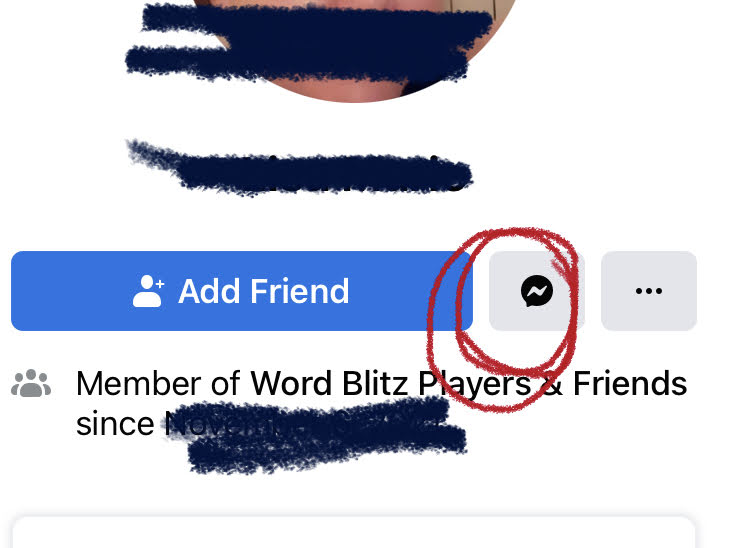
In groups like Word Blitz Players & Friends, from time to time someone would post something along the line of, "I need players!"  Instead of sending them a friends request, send them a message.  That's the white squiggly thing in the black speech balloon, as highlight in red below.


Write in the message something like, "Let us play Word Blitz"


Immediately open Word Blitz in Facebook Gaming and click Play With Friends.  Yes, to Word Blitz having sent a message to someone makes that person a friend you can start a game with.  There are cases where that's not true but in general it works.


You don't get to see your list of friends to choose right away.  Instead, Word Blitz always invite you to play some tournament.  We don't want tournaments for now so just scroll a little bit down.  It always show the last three people you exchange messages with, including people who just played their turn.  If you don't act fast, your "new friend" may be bumped off the list.  That's why as soon as you send that ice-breaking message, go immediately to the game and click Play With Friends.


Go back to that group where your "friend" said they need players.  Comment that you just started a game with them.  Tell them to accept it by clicking on your name and clicking the Message icon, that white squiggly thingy inside the black speech bubble, as shown below.  They should say something back, like "OK, let us do it".  They should then go to Word Blitz and find the game that you started with them.  Back and forth you can play.  If the skill level turn out not so comparable, don't start a new game when one is done.  Or done respond to a new game request and it will go away in a few days.  Rather drastic but I heard of people blocking others just so that the other person no longer start unbalnced games with them.


Perhaps because of different privacy laws in different nations of the world, when the requester is in a country different from yours this little trick may not work.  Facebook, or maybe Lotum, the German-based company that puts out Word Blitz, is an international company and have to adjust their environment to satisfy the different laws.  So far with this technique, I can play people in the U.S., India, Australia, etc.  Not possible are people from Greece, the U.K., and maybe Ireland.  I am sure there are more countries for both lists.  I have enough players so I don't seek people out that often.  As the saying goes, your mileage may vary.

24 October 2021

HOW TO SHARE A WORD BLITZ TOURNAMENT TO A FACEBOOK GROUP, iPHONE VERSION

 At the rate of changes Lotum introduces to the game of Word Blitz, it seems silly to even bother writing instruction on how to do things, but I persist.  Here goes another instruction for HOW TO SHARE A WORD BLITZ TOURNAMENT TO A FACEBOOK GROUP.

Pre-requisite: be a member of the Facebook group Word Blitz Tournament Center at https://www.facebook.com/groups/435605317529797/

Recently, Lotum added a Podium icon for the purpose of creating tournaments.  It is circled in red in the picture below.  As long as you don't already have seven tournaments going, whether created by you or others, you will have the Podium icon.  (At one time, it was an icon of a Trophy.  But then it started to malfunction, went away, and now it's back as a Podium.)  Clicking it will create a new tournament.


The tournament is almost created...  First, make sure under your name there is an icon of the globe and the word Public.  That's the Privacy setting.  It needs to be Public, so that anyone can play the tournament.  To finally create the Public tournament, click the Share button.


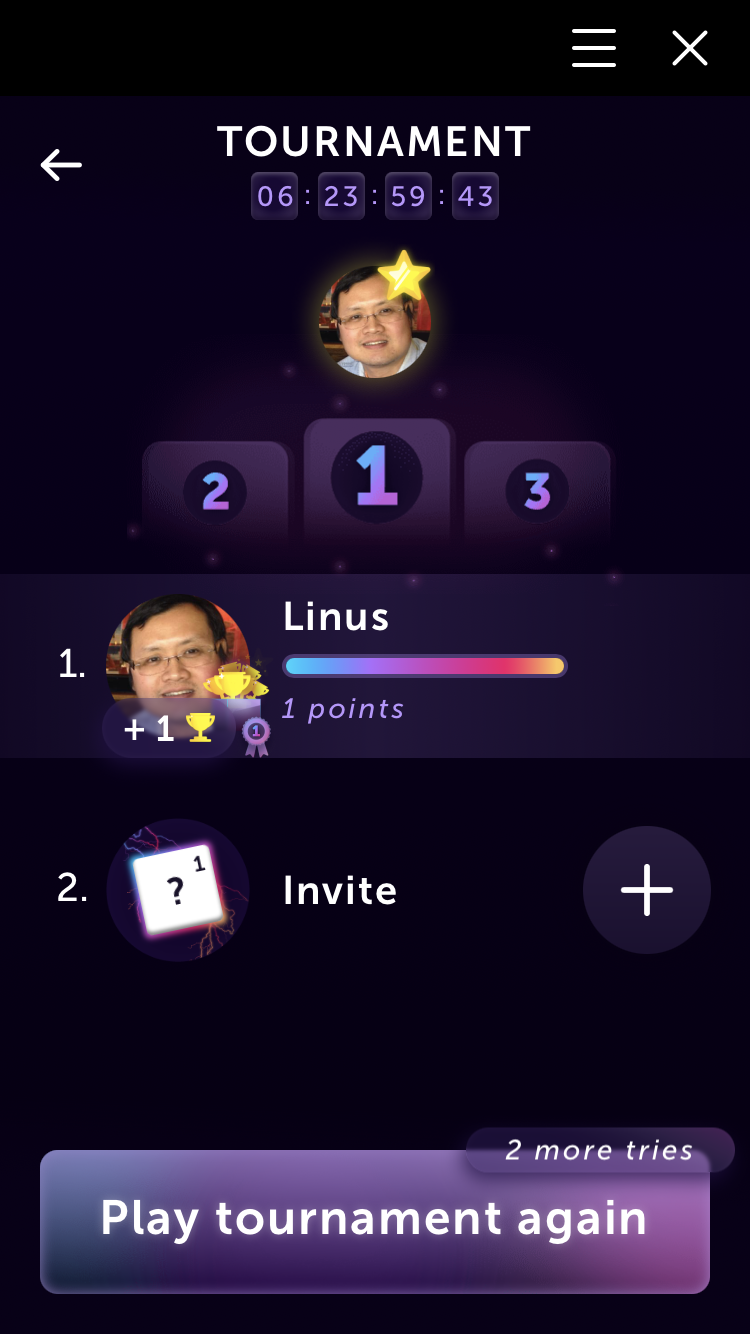
After clicking Share, just sit back and wait for the tournament to show up.  Note the time and date info under the word TOURNAMENT.  A tournament lasts 7 days, I was already 17 seconds or so since the time I created the tournament, so it will run for 6 hours, 23 hours, 59 minutes, and 43 seconds.  The game is shared to my Facebook profile and it's been only 17 seconds or so thus nobody joined the game yet, I am the only and therefore #1.  Click the X in the upper right corner to close the new tournament.


Out of the Word Blitz game environment and back in the Facebook screen, click Menu in the lower right a few times until your name and profile photo appear at the top left.  Click See your profile.


On your profile page, scroll down a bit to find the newly created tournament.  Click the Share button in lower right.


There are many ways to share a tournament.  For our purpose, click Share To A Group


I already shared many tournaments to the group Word Blitz Tournaments Center, with Facebook knowing everything about its users, the group is listed at the top of the list.  If it's your first time doing the sharing, you would need to click the Magnifying Glass next to the word Search and type in a few letters of the group name, starting from the left.  I think Word Blitz would be enough, unless you joined many groups that start with those words.


Three things to notice in this final step: 1- the group name now shows under your name; 2- the tag, which is the hash sign # (also known as pound sign) followed by the day of the week; 3- the Share Now button.  

#Sunday in this case denotes the tournament was started on a Sunday.  To circumvent the restriction of 7 tournaments, some people seek to join only tournaments that end within hours or minutes.  By using the Topics button at the top of the group, they can see the various tags corresponding to the day of the week.  In the ideal world, tournaments that ended would already be deleted by the original creator or by an admin or moderator, so that you would only see tournaments that ending on that day of the week, plus the ones that were started on that day.  For example, if Joe started 3 games on a Sunday, a week later those games will appear as ending in hours or minutes.  Similarly, if Peter started 2 games on the morning a week after Joe started his 3, Peter's 2 games will also appear when the #Sunday filter was applied.

Finally, the Share Now button is what completes the process.  Go ahead and click it!


22 August 2021

HOW TO SHARE A WORD BLITZ TOURNAMENT TO A GROUP

 Word Blitz, the popular Boggle-clone word game, has yet more "improvements" that make sharing a tournament game to a group even more difficult.  There are slightly different versions of Word Blitz, the one I am discussing is played via Facebook.  First some background:

At its basic level, you play Word Blitz against a friend.  Next up, you somehow hook up to a non-friend.  The two of you play three rounds of the game and whoever have the most points win.  As surprising as it sounds, sometimes you cannot find opponents to play against.  Again, I am talking about the Facebook version, where games are limited by the friends or non-friends you have who also play the game.  There is also another outlet, The League, where you can usually play up to six single-round games, one at a time, against a random player.  Personally, I think it is great that the game doesn't make it too easy to play all the time.  Smartphone users in general already spend too much time playing games.  But then again there is the Tournament option.

With Tournaments, you can play against a wider range of players.  You have up to seven days to try again and again with different board configurations, not of your own choosing, to get the best score you can.  There is a limit of seven tournaments you can join at any given time.  Still, having seven games over seven days is still a lot of play time.  Alas, the issue again is finding people who would join the tournament games you created, which by default only appears on your own timeline.  So you need friends who would join.  I am somewhat selective these days and try not to have new Facebook friends unless I already know them in person.  Or have a need for it, like teachers at my old high school, since I run an active alumni group.  Others may have other reasons not to friend people on Facebook.  This is where Facebook groups created solely for sharing Word Blitz tournament games come in.  One such group is the Word Blitz Tournaments Center, located at https://www.facebook.com/groups/435605317529797 .  I am a member of the group and a frequent question is "How do I share to the group?"  I hope the instruction below will help.  The instruction is for an iPhone user in the U.S.A.  In future posts, I can make another for Apple MacOS or Microsoft Windows.  Go join the group before you follow the instruction.

Recall that I mentioned there are changes to the game that makes sharing tournaments more difficult?  It used to be you can create an almost limitless number of tournaments while participating in only seven or fewer.  Maybe some or many tournaments ended up with no participants or maybe the many number of tournaments somehow cost Lotum, the distributor of Word Blitz, too much money.  The new rule is you have to be in a tournament game else nobody can join it.  You still cannot play more than seven games simultaneously so create tournament games only when you have fewer than seven games going.  If you already play seven games and try to create a tournament, you will get some unhelpful error message.  No, it does not tell you that you already have seven games active and that you must be in a new tournament game that you create.

On with the instruction!

At some random schedule, there is a podium icon that sorta reads Create Tournament, as circled in green.  Note the partly hidden Invite button on the far right of that row.  It may be necessary to scroll sideway to bring the podium icon into view.  Click Create and you will be on your way to creating a tournament.

Be sure to click the line below your name to have it show Public.  If it is left on Friends Only then group members who are your friends cannot play.  Next click the Share button near the bottom then don't do anything for a few seconds.  If you have fewer seven games going, in a few seconds a new game will start.  Give it your best, if you wish, to get some high score then leave Word Blitz altogether.


Click the Menu icon in the lower right then scroll to the top and click See Your Profile.  Try to do this as soon as you quit Word Blitz in the above step, before your timeline have other new stuff.

The new tournament game you created and shared to your timeline should be easy to find.  Click on its Share button.  Note the score of only one point.  If I played some words before, my score would be higher.  In this case, I didn't play any words.

Click Share To A Group (I used title-case to make the instruction easier to follow.  I am aware the actual title for link is slightly different).

You should already be a member of the group called Word Blitz Tournaments Center.  In the screenshot, next to the magnifying glass, I typed to and the list of groups shortened to just two items.  I clicked on the lower choice.

At last we come to the final step to sharing a tournament game to a group.  Note that near the top of the screen the group name is shown.  I strongly recommend entering some info to make your game different than the many others that are shared to the group.  Of great use is the day of the week.  Recall that games last seven days.  Some people like to join games that end soon, so that they don't have to wait a week to join a new game.  For example, if you join seven games that were started on a Sunday, you can only play those seven games and cannot join any new ones.  When you include the info, i.e. day of the week, in your posts, people can search for the word Sunday, or whatever the case, and join only those games.  Finally, click Share Now and your game will be shared to the group for all to enjoy.

31 May 2021

THROWN UNDER A BUS, WHEW, JUST A DREAM

 Many books have been written about the subject of dreaming, as in seeing things while sleeping.  I wish I know a better word to describe it.  Nowadays, to dream can also mean wishing for something, a positive thing.  The English language can be great for making puns and being ambiguous but sometimes I want to be direct about the subject.  I want to simply talk about the things I saw while sleeping, something that my brain somehow made up on its own, not because I want it to really happen.  Sure, it maybe something I did subconsciously, fer sure.  But not something I actively want.  But enough of the meaning of "dreaming".

In real life, I am a cautious pedestrian.  I always look both way crossing the street.  I don't wear headphone and such, so that I am always aware of my surrounding.  Definitely not staring at the smartphone screen while walking, as some people I know regularly do, very annoying.  But in last night's dream, for lack of a better word, I caused a three-bus accident at a street intersection that seemed to be that of Canal Street and Baxter Street in Manhattan Chinatown.  I crossed Canal Street from the north side to the south side but then immediately tried to cross to Baxter but the light was changing.  A bus in the bus stop was moving forward so I tried to run behind it but then another bus was going in the driving lane.  It seemed as I tried to go back to the sidewalk yet another bus came from the other direction of the two-way street.  Now, in real life Baxter Street is very narrow, just enough for two parking lanes and one driving lane, it's a one-way street.  In this dream, it was a two-way street, wide enough for buses to go through, so maybe it wasn't Baxter, but hey it was a dream, it didn't have to match reality.  Anyway, perhaps because the third bus tried to avoid me, it braked too hard and went flying and hit the first bus.  Again, physics may not apply in dreams.  One thing I was sure is that as the levitated bus came at me, I was alert enough to lay flat and the bus flew right over me.  I do recall feeling guilty for causing the accident, who knew how many people died or got hurt, so I guess my dream version also had integrity.  I don't know what happened next because the shock in the dream woke me up.  Or maybe it was my busting kidneys needing to unload.

Yes, back to reality.  It is a three-day weekend, Memorial Day today, thank you to all who made the ultimate sacrifice.  It was rainy for the first two days so I was home all day.  I was hoping to do something outdoor today but the house has a plumbing problem.  A plumber came yesterday but the problem is bigger than originally thought.  He's coming back today with tools to rip off part of the bathtub wall etc.  Water's been shut off for now for the whole house.  It's a minor inconvenience, we lived through worse times.

30 May 2021

STILL NO INDOOR DINING AT MACDONALD CARTERET

 This past Friday I again had breakfast not at home.  I was happy to see that the MacDonald's in Carteret was done with the renovation.  "We are open!", the sign said.  Alas, unlike the Burger King down the road, they still didn't have indoor dining.  Nope, take-out only.  Ironically, on that day New Jersey governor announced additional relaxation of COVID rules, that businesses were free to not require masks etc.  I suppose Mickey Dee wanted to be extra safe.

This past Sunday I was in Chinatown for an errand.  On Mott Street I saw what appeared at first as one of those outdoor dining structure being taken apart.  Ah, another sign of the city going back to pre-pandemic atmosphere, I thought.  Just to be sure, I stood a few buildings away to observe the "dismantling".  Nope, I was wrong.  The workers were carefully measuring things with retractable measuring tape then screwed things down.  It was an additional area they were working on.  Weird, if you ask me, but who knows, maybe this particular restaurant was slow in getting the outdoor permit or things are going so well with outdoor dining they decided to add a few more tables outside.

Something else I noticed on Mott Street was that perhaps because of the outdoor structures, there were cars parked halfway up the sidewalk.  The drivers were in the cars, I suppose in case the traffic cops come around they would move.  It was news to me but who knows, maybe it had been like that for a while, since I rarely go into Manhattan these days.  The scene reminded me of a certain section of Pennsylvania Avenue in Brooklyn, just a tad north of Linden Boulevard.  Street parking is allowed, except for certain days when there was street-cleaning.  However, the road is narrower than usual, so perhaps voluntarily all the cars would park halfway on the sidewalk.  It is illegal probably but maybe there's an unspoken rule between the traffic agents and the local drivers.  Maybe too many cars got side-swiped so people don't want to take a chance with parking completely on the street.

21 May 2021

ANOTHER SIGN OF NORMALCY - EAT-IN AT FAST FOOD RESTAURANT

 I am happy to report that today I was able to have a sit-down breakfast at the Burger King near my office.  For a long time now, I had my breakfast, whether My Way or Not, in the car.  I usually have a podcast going, either Somethin' Rhymes With Purple or Ask Me Another.  It's nice and all, but I want the option of sitting at a table and not worry about littering in my own car.

Perhaps because of the nearby McDonald's being closed for renovation, service was slow at Burger King.  No one else was in the dining area, but the drive-by window had to be busy.  At least it seems that way.  I do prefer McDonald's one chunk of hash brown as opposed to the King's little tots.  Hopefully McD will re-open soon.  It's a little closer to the highway exit, BK being a little further away.  I am a lazy driver, the less I have to drive the better I feel.

WE ARE LIVING IN INTERESTING TIMES...

 We are living in interesting times but we have no time to write things down to look back on.  I love history and especially enjoy recalling my own past.  Social media is nice and all but I still prefer a blog.  I hope to revive this blog, at least try to have new posts every weekend.  Where did I hear that before?  It cannot hurt to try.

What happened today (Wednesday 19 May 2021)?  New York State followed CDC recommendation to relax mask requirements for vaccinated people.  I will go along with that, unless I am in an enclosed area with other people.  Who knows if any of them are anti-vax people who may be carrier of the disease or its variants.

My CityStrides.com stat isn't so great these days, at least with regards to Brooklyn.  For a while, for fear of the COVID-19 virus, I didn't run at all.  Did all my exercising in the backyard or in the living room.  I did resume a bit but it's a slow process.  Carteret, NJ and Staten Island, NY are now my main focus during the week.  I work in Carteret and go through Staten everyday.  I thought I was #1 in Carteret but all of a sudden some Private User popped out of nowhere to put me in the #2 spot.  Staten Island I have a comfortable lead but I have to keep it up.  So many streets, so little time.


[Originally written on perhaps May 19, 2021, but it's been so long since I blog that I forgot to click the Publish button until today.  Sigh.]


16 January 2021

OPEN OUTLOOK WITH MULTIPLE VIEWS

It's been a while since I literally work a desk job, i.e. sitting at a desk with my own phone extension, a computer monitor, drawers for my own stuff etc.  I started a new job about a month ago and that's exactly what came with the job.  I now also have two monitors to work with, a great thing to have to meet today's work demand.  One monitor for email, the other for the web etc.  With two monitors, I rarely need to print things out, just put the things to compare side by side.

One thing I love to do is have my programs run as soon as I log in.  Outlook, Chrome, Windows Explorer, a DOS box, etc. stuff that I would launch sooner or later.  As I now have two monitors to use, I started the habit of having up to three views of Outlook while using it.  Most people have Outlook show them their email then switch to the Calendar view when needed and switch back afterward.  Instead of just clicking on Calendar, if you right-click on it there's an option to open the Calendar in a new window.  I do that, also for Notes.  Nice to have Mail, Calendar, and Notes up and ready, just a click away, without having to switch back and forth with Mail.

I already have Outlook starts up along with other programs but it only opens the Mail view.  I knew there must be some command line switch I can use but at first there seems to be none.  (FYI, most, if not all, programs that you use in Windows is actually a pretty icon on the front, behind it is some filename that ends in .exe and such that you can type to start the program.)  I did come across this link, https://support.microsoft.com/en-us/office/command-line-switches-for-microsoft-office-products-079164cd-4ef5-4178-b235-441737deb3a6#ID0EAABAAA=Outlook but it wasn't so obvious.  Ultimately, it was the /select foldername option but the use of the word foldername threw me off.  I think of folders as those things I created in my Inbox to keep things tidy.  I have one for my boss, one for some news subscription, etc, with matching Rules to filter the incoming mail into them.  I am lucky now that I don't have many email message to wade through but if needed I can easily find my boss' email because he has his own folder.  But folder the way Outlook sees it, per the Microsoft link anyway, is what I think of as View.  So what I have now are three separate commands:

c:\program files\microsoft office\office15\outlook.exe" /select outlook:Mail

c:\program files\microsoft office\office15\outlook.exe" /select outlook:Calendar

c:\program files\microsoft office\office15\outlook.exe" /select outlook:Notes

The exact path to Outlook.exe may be different for you, depending on whether you use the same Office version etc.  I already have an Outlook shortcut in my Startup folder, set to the Mail View, so I copied it twice, then edit the path to use outlook:Calendar and outlook:Notes.  Voila!  As soon as I log in, I have the three "Views" opened for me.  

06 January 2021

WORD BLITZ - PLAY WITH NON-FRIENDS

My current favorite word game is Word Blitz by Lotum, usually played through Facebook's relatively new game engine.  It's basically a Boggle clone, i.e. you have a grid of letters to work with, connect the letters to form words in the allocated two minutes, in a race against an opponent.  Like most word games, the words you form don't necessarily have useful daily usage, but rather it depends on the letters' assigned points, not unlike Scrabble.

One strange thing with the Facebook version is that you don't get to randomly play against opponents, not easily anyway.  You either drag many of your friends into the fray or earn some Hearts, whether through a timing system or by watching video ads, so that you can play in a tournament.  I suppose that's how they primarily make money, eyeballs supposedly exposed to advertisements.  While the game is popular, many people have a hard time convincing friends to play the game.  Waiting around to have enough Hearts to be able to enter a tournament is a pain.  A popular request in some Facebook groups for players of Word Blitz is that they need friends to play with.  There is no obvious way to play with people who are not already a friend in the Facebook world.  But it is true that you don't need to be a friend of someone to be able to challenge them to a game.

The trick is you first need to make a connection with a player via Facebook Messenger, which is the messaging system in the Facebook ecosystem.  Anyone can send a private message to anyone via Messenger, unless one party doesn't like the other and already blocked them.  When you see someone say, "I need someone to play me!", go to their profile and send them a message, something like "Let us play Word Blitz!"

Next launch Word Blitz and scroll down the Leaderboard, all the way down to the bottom of the list to find the Invite entry.  In the screenshot below, I scrawled over people I am friend with to give them some privacy.  Click on the plus sign next to Invite.


Scroll a bit down to find the list of people who you recently exchanged messages in Messenger.  It can be a friend or in this case, the non-friend that you just verbally challenged to a game.  That challenge of course was nothing more than to establish a link, so that that person would show up in the list after you clicked the plus sign in the screen before.  Click Play.


That's it!  That's how you can play people who are not friends with you on Facebook.  Personally, I do this from time to time.  People would send me friend request for the sole purpose of having an opponent.  It is so unnecessary once you know this way.  Not straightforward, but it works.  I'd rather just play someone this way instead of having to see people's posts in my feed.

25 November 2020

STRAVA MULTIPLE RIDE MAPPER

I love technology, things like computers, smartphone, and programming.  I also enjoy long distance running as a form of exercise.  It's wonderful when the two areas of my life converge.  Through a blog comment, I learned about the tool called Strava Multiple Ride Mapper (SMRM), http://www.jonathanokeeffe.com/strava/map.php .  It's a web form that lets you specify a range of dates to load your Strava activities and put them all on a map.  It works for most Strava activities, like running and walking, not just bicycle rides.  My first use for it was to make a word without having connecting lines between the letters.  It can be done but it's tedious.  You have to end a run after each letter.  Three-letter word would mean three separate runs.  I think the system that I have in place, whereby most of the time the letters are linked at the bottom, works fine for me.  It does save time, like if you make the letter U you can just end at the upper right corner instead of having to run back down to the bottom of the letter.  But as I said, it is too much work, from my point of view.  I also don't like to monopolize people's Strava feed.  For example, if I spell Strava with SMRM, that's six separate runs, or six entries in the Strava feed of people who follow me there.  I just don't like it.  I regularly unfollow people on Facebook who regularly post nothing but links to YouTube videos, one after another.

What SMRM is great for is to make phrases and I put it to use with my latest three runs.  The phrase is Live Laugh Love, that cheesy phrase seen all over Etsy.  I planned the words so that they are kinda strung together but not on the same baseline.  I like to work with rectangular grids but there is not enough room to spell all three words across.  It may be possible to stack them but I really like how the phrase turned out.  It's irregular, less boring, somewhat whimsical.

A few tips on using SMRM:

  • You do have to grant SMRM access to your Strava account.  If you are hiding from The Man, or working for The Man on a secret mission, this is not for you.  You probably shouldn't be using Strava in the first place anyway.  Or something like that, you know what I mean.
  • Have patient once you click that Load button.  It takes a while to parse through your Strava activities to find matching info.  Not only can you specify the date range, you can also select type of activity, whether to ignore Commuting entries, etc.  Give it some time.
  • While the tool works on smartphones, it's best used on a desktop or laptop computer.  If you have to do it on a smartphone, put the phone in landscape mode first.
A wish-list:
  • Strava recently switched to OpenStreetMap and while there are some downside to it, a welcomed change is the lack of all these local businesses clogging the map.  Google makes some money with all that info, not the open-sourced OpenStreetMap.  I wish SMRM would get away from GoogleMap too.
  • There's a link called Download KVM but it doesn't work.  I love to explore all the features of a given app or tool, but clicking that link only produces the error message There was a problem generating the KML file, please try again.
  • Similarly, if you try to give the author feedback, the link for that gives me the error Your PHP installation appears to be missing the MySQL extension which is required by WordPress. I don't know what that means and don't want to go through the trouble of "fixing" my system just to leave a comment.
The author, Jonathan Okeeffe, actually has a few Strava tools offered.  I find SMRM useful and made a donation.  Check it out and donate if you agree it's a good tool to support.


22 November 2020

WII FIT PLUS SEGWAY CIRCUIT

When I feel lazy in Wii Fit Plus, I merely play the Balance Games instead of doing yoga poses or strength exercises.  The nice thing with Wii Fit Plus is there are many more so-called Balance Games.  Wii Fit Plus may call them something else, but they are basically games, something more interesting than the regular exercises.  I got pretty good with all the games and was able to secure the top spot, or completed all the levels.  Until I hit Segway Circuit.  Pretty much the only control you have is lean forward to move forward and lean backward to, uh, move backward.  Well, you also turn left and right by turning the WiiMote, which you hold horizontally with two hands, the front of the WiiMote (the part where the infrared light shoots out) pointing to your left.  The goal of the game is to go around bumping into beach balloons that were inflated by moles or gophers.  There is a time limit and the last mole has rocket-propeller to travel faster.  With the Amateur Level, it took me a while to realize that the only to catch up to the Last Mole is to use a ramp to speed up.  One bump into The Boss Mole, I think, and it's game over for Mr. Mole.  Or at least that's what I vaguely recall.  I should go back to it just for fun.

For the longest time, or at least it seems so, I was stuck with the Advanced Level.  There are more beach balls to bust and that Last Mole was impossible to catch.  Through some YouTube video, I learned that once you have the puppy to follow you, pressing A sic the dog to the Balloons.  It saves you time from having to traverse the distance to bust the Balloons yourself.  Just travel a bit toward a Balloon, press A, then the dog will do its job.  Be careful not to press A too many times.  Press once to get the Balloons busted by the dog, but don't press too quickly or you will call the dog back to you.  Another button that is useful to know is the 1 key.  In the overview map on the right, pressing 1 will zoom out a little bit to show you where the Balloons are, so you don't end up wandering all over searching for them.  Lastly, don't bump into the Moles while they are above ground.  You lose points and I think it makes them run away to another hole, making it harder for you to bust the Balloons.

Even with more time at the end to chase the Last Mole, I still couldn't catch it.  Eventually, I realized that the dog can only do so much work.  It may slow the Mole so that I can bump into it, to bust its on-board balloon.  The on-board balloon is replaceable, so pop one and another one comes out.  Only after the third balloon popped that you would be done.

I am now on the Expert Level and it seems to be even more difficult.  There are buildings to go around, Balloons may be on the sidewalk or within some place that's higher than the road, thus your progress is slow.  I think the trick is to get the dog as soon as possible.  Luckily, the dog seems to be in the same spot all the time.  In the Advanced Level, it's under the tree on the left if you make the first right turn on the road.  In the Expert Level, it's between the building in town.  I will try to ignore all the Balloons and go hook up with it next time.  That may be the only way to quickly bust all the Balloons, with the dog's help, to have more time to defeat The Boss.

30 October 2020

POWER OF ADVERTISING

 Someone recently joked that he was so bored at home that he started buying stuff through Facebook ads.  My one experience with that ain't so great.  We spend so much time in FB it makes sense that the advertisers would target us.  The thing I bought was some motion-sensing LED light.  Perhaps because many FB users also went for the same ad, it took me a few weeks to receive the item.  It was about $20, light is yellowish, and needs to be re-charged every few days.  Yes, the seller kept me updated, but it still took what seemed like a long time.  Some time later I bought two sets of 3-pack lights from Amazon, from two different vendors just to see the differences, for about $10 each light.  The Amazon stuff, as usual the case, arrived in a few days.  The Amazon lights also last for weeks before requiring a charge!  There are actually many choices with Amazon but for now I prefer the LED lights from Otinlai.  I like that they have a physical switch to go between Always-On to Off or to Night-Mode.  The other light I got from Amazon has one button to press to cycle through the three modes.  I had to read the little text on the light's body each time I want to make the changes. 

29 October 2020

VOTE

 On Monday, I voted early.  It was relatively painless, I just walked in, had my barcode scanned, signed, made my selections, scanned both sides of the ballots, then out in maybe less than 15 minutes.  From what I heard on Facebook, the scenario was different elsewhere.  People waited on queue for hours.  I did go to the poll with a book and with my iPhone fully charged.  I've been trying to cut back on Social Media time on the iPhone but I was hoping to catch up on the many podcasts I subscribe to.  It is good to come prepared.  Wednesday I had the opportunity to go for a morning run and the message is VOTE.


27 October 2020

I VOTED EARLY

I voted early! I suspected the weekends would be busy so I waited until Monday to do it. The rain probably discouraged some people to procrastinate. It was quick, no waiting at all. I walked straight in, some staff member shouted at someone at the door that no photography allowed at the entrance, I proceeded to the check-in desk.

I recall when I worked on Election Day some years ago, the workers were assigned these booklets that let us look up voter's Districts, based on that the staff, at the desk for the Districts, would find the voters' documents for them to sign. It was a two-step process.  We had to use a straight edge to better find the info.  One colleague had the great idea of writing certain oft-needed info on a separate piece of paper and that helped sped things along. Today, the workers had some tablet device that can scan the barcodes on the booklet I received in the mail, which I brought with me. Signed my name with a stylus and off I went with a ballot to the filling station, filled in the many bubbles needed, then finally walked over to the scanning station. The scanner doesn't do duplex so you have to scan one side then flip the ballot over and scan again. Let's hope wherever those scanned data go it's securely protected against tampering!

Vote early if you can. All the info is actually in the voter's booklet you already received in the mail. Where to go if you want to vote early, the hours the place is open (some day it opens early, others it closes late, to accommodate different people's schedule), plus the usual info related to Election Day, it's all there.  I found things via the 311 app on my iPhone but it wasn't necessary. Bring the booklet with you, open it to the page with the barcodes, save everyone's time.  I was lucky to walk right in but by the time I left, a queue was already spilling out of the building.

26 October 2020

NO MACS SLEEP IN BROOKLYN

My desk is tiny but sometimes I want to use an external keyboard with my Mac laptop.  With an external monitor connected, I want to close the laptop lid then rest the keyboard atop it.  Alas, I soon found out that, unlike Windows, there was no system setting to tell the Mac to Do Nothing and stay awake.  Instead, as soon as the lid closes, the Mac went to sleep.  Supposedly there was some app to force the Mac to stay awake but it was no longer in development.  What I have been doing is, either keep the Mac's lid open and use the external monitor as additional real estate, or jam the lid so that it wouldn't close all the way and use the second screen as a mirror of the laptop.  I sometimes use a Bluetooth keyboard from Apple and it jams the lid perfectly.  But there must be a better way.

By mere coincidence, I recently had my Mac laptop connected to power source, as opposed to running on the built-in battery, and closed the lid while connected to a monitor.  Boom!  There it is, on the glorious second screen, my Mac screen!  The computer didn't go to sleep, it simply went from two screens to just one, which is fine.  I can now put a full-sized keyboard, or whatever keyboard I want to use, right atop the closed laptop.

It's nice to discover things on my own, but I suppose with the correct terms to search I would eventually come across the official words from Apple:

https://support.apple.com/en-us/HT201834

25 October 2020

SCREEN TIME GRAY BARS = SCREAM TIME

 I recently resumed using iOS Screen Time, found in Settings, to keep track of my iPhone usage.  As suspected, I spend too much time on Social Media, in particular Facebook.  Lots of other useful info, like how often the phone got picked up, what apps were launched after that.  Nice little bar graphs to show you what's going on.  What's not so nice is there are these gray bars that don't seem to match anything.  You would think the Internet has the answer to everything, but after some Googling, or maybe Bing-ing, the answer is either Miscellaneous Apps or, gasp, Background Tasks carried out by the iPhone itself.  I am not convinced of either answer but if I have to choose one it would be Miscellaneous.  If it's Background Tasks, then this is a classic case of the nerdy engineer collecting info that is useless for the average user.  Screen Time's primary use is for the user to see how much time he uses the apps.  Things that he initiated.  Background Tasks are not initiated by the users and should not be included in a graph that shows how user spends his time.  Maybe in The Matrix, the Computer Overlord may be interested in Background Tasks, but out here in our simulated world, we only care how much time we spend scrolling down our Facebook Wall.